
How to Calculate Target CPA in Google Ads
- Published:2025-02-08
- Updated: 2025-09-18
How to Calculate Target CPA Google Ads
How to calculate target CPA Google Ads is the key – because running ads without knowing your numbers is the fastest way to burn money. That’s why serious advertisers focus on their cost per acquisition (CPA) – the amount they’re willing to pay for each new lead. Google’s target CPA bid strategy can automate bidding to hit that number, but if you set the wrong target you either overpay for leads or starve your campaign of traffic. In this guide we’ll demystify target CPA.
You’ll learn what it is, how it differs from general CPA, and why getting it right matters. We’ll walk through two calculation methods: one using historical campaign data and another based on your profit margins, close rate and conversion rate.
You’ll also find industry‑specific examples, a downloadable calculator, step‑by‑step instructions for setting target CPA in Google Ads, and advanced tips for optimising and adjusting your target over time. By the end, you’ll know exactly how to set a realistic target CPA – and how to use it to grow your business profitably.
Contents
- 1. How to Calculate Target CPA in Google Ads
- 1.1. How to Calculate Target CPA Google Ads
- 1.2. What Is Target CPA in Google Ads
- 1.3. Why Calculating Your Target CPA Matters
- 1.4. How to Calculate Target CPA Google Ads - Two Methods
- 1.5. How to Calculate Target CPA Google Ads – Why You Need to Know
- 1.6. Inputs Needed for How to Calculate Target CPA Google Ads
- 1.7. Set Up Conversion Metrics for How to Calculate Target CPA Google Ads
- 1.8. How to Use a target CPA Calculator Online to Calculate Target CPA in Google Ads
- 1.9. Quick Method with Past Data to Calculate Target CPA in Google Ads
- 1.10. Set Up Target CPA Bidding in Google Ads After You Calculate Your Target
- 1.11. Adjust Your Target CPA Over Time After You Calculate It in Google Ads
- 1.12. Compare Target CPA with Manual CPC and Other Strategies When You Calculate Target CPA in Google Ads
- 1.13. Improve Campaigns to Hit Your Calculated Target CPA in Google Ads
- 1.13.1. Improve Your Lead Capture Page and Funnel to Meet Your Calculated Target CPA
- 1.13.2. Use High-Intent Keywords to Achieve Your Target CPA in Google Ads
- 1.13.3. Optimise by Location, Time and Device for Your Calculated Target CPA in Google Ads
- 1.13.4. Leverage Audience Segments to Hit Your Calculated Target CPA in Google Ads
- 1.14. Common Mistakes and How to Avoid Them When You Calculate Target CPA in Google Ads
- 1.15. Align Target CPA with Customer Lifetime Value When You Calculate Target CPA in Google Ads
- 1.16. Real-World Examples to Calculate Target CPA in Google Ads
- 1.17. Advanced Tips and Best Practices for How to Calculate Target CPA Google Ads
- 1.18. Free CPA Calculator for How to Calculate Target CPA Google Ads
- 1.19. Conclusion and Next Steps After You Calculate Target CPA in Google Ads
- 1.20. FAQ: How to Calculate Target CPA Google Ads
- 1.20.1. What is Target CPA in Google Ads?
- 1.20.2. What are the two main methods to calculate Target CPA in Google Ads?
- 1.20.3. To properly learn how to calculate target cpa google ads, how should I set up my conversion metrics?
- 1.20.4. How does a free online calculator help with the process of how to calculate target cpa google ads?
- 1.20.5. Is there a quick method using past data for how to calculate target cpa google ads?
- 1.20.6. What is the specific profit-based formula used for how to calculate target cpa google ads?
- 1.20.7. After I learn how to calculate target cpa google ads, what is the key step for setting up my bidding strategy?
- 1.20.8. As part of managing my campaign, how do I adjust my bids over time after I calculate target cpa google ads?
- 1.20.9. When I'm deciding how to calculate target cpa google ads, how should I compare it to other strategies like Manual CPC?
- 1.20.10. To successfully apply the principles of how to calculate target cpa google ads, how can I improve my campaigns?
- 1.20.11. How does improving my landing page impact the final results when I calculate target cpa google ads?
- 1.20.12. Why are high-intent keywords so important for the strategy of how to calculate target cpa google ads?
- 1.20.13. In the process of learning how to calculate target cpa google ads, how should I optimise by segment (location, time, device)?
- 1.20.14. When applying the method of how to calculate target cpa google ads, how should I leverage audience segments?
- 1.20.15. What common mistakes should I avoid when I learn how to calculate target cpa google ads?
- 1.20.16. For an advanced approach to how to calculate target cpa google ads, how do I align my strategy with Customer Lifetime Value (CLTV)?
- 1.20.17. Can you provide real-world examples of how to calculate target cpa google ads?
- 1.20.18. What are the advanced tips and best practices for how to calculate target cpa google ads?
- 1.20.19. Where can I find a free calculator for how to calculate target cpa google ads?
- 1.20.20. What are the next steps after I learn how to calculate target cpa google ads?
- 1.20.21. Daniel Ostrzyzek
- 1.21. Let's Talk!
What Is Target CPA in Google Ads
Target CPA is a smart bidding strategy in Google Ads. You set the maximum amount you’re willing to pay for a conversion (like a lead or phone call). Google then uses machine learning to automatically adjust your bids in real time to try and hit that cost. Google considers factors like device, time, audience, and intent when setting bids.
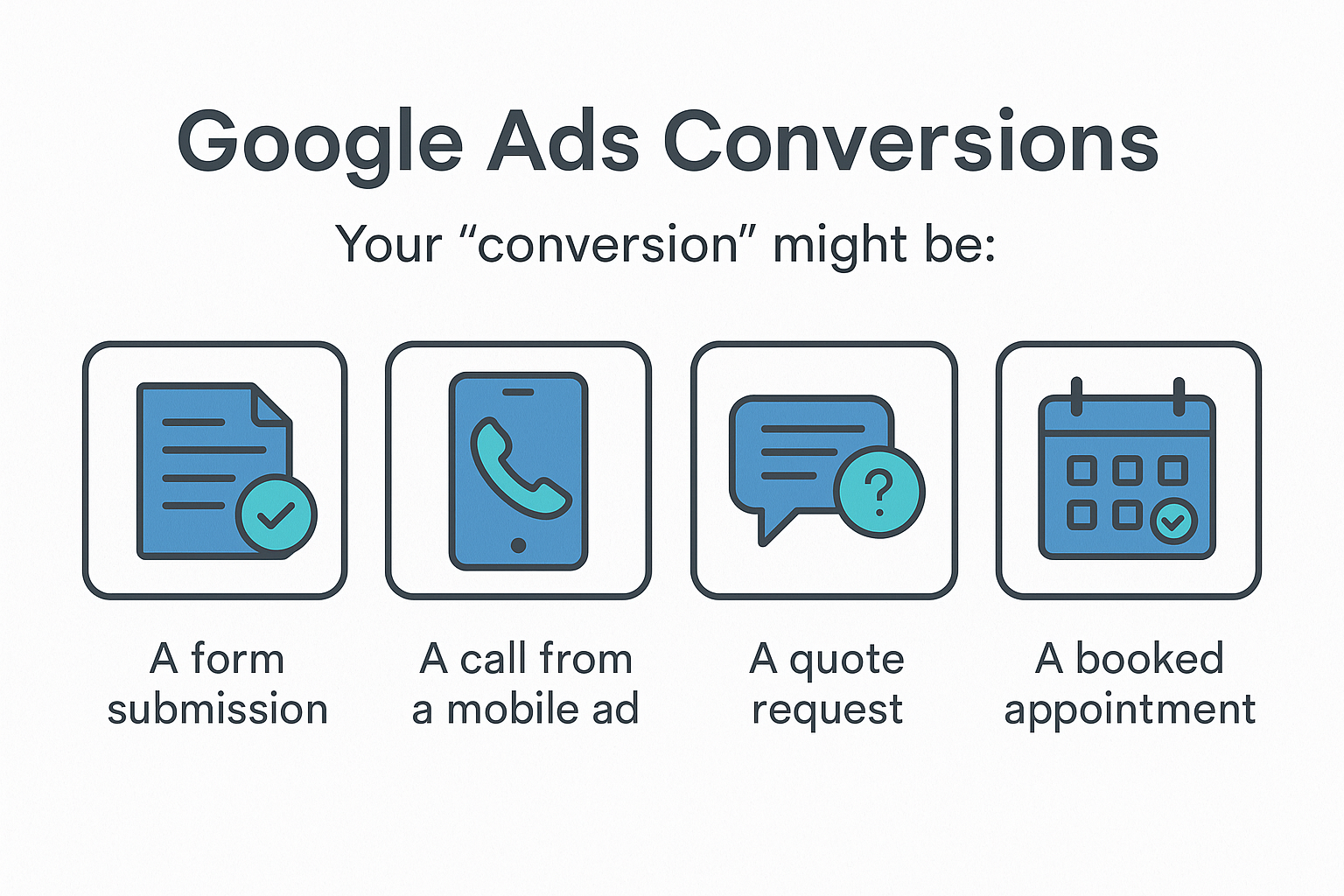
In Google Ads, a conversion can be:
- A form submission
- A call from a mobile ad
- A quote request
- A booked appointment
But target CPA only works well if:
- You’ve tracked at least 30 conversions in the past 30 days
- Your conversion tracking is properly set up
- You’ve already run a campaign long enough for Google to learn
Why Calculating Your Target CPA Matters
Guessing your Target CPA is a fast way to waste money.
Why it matters:
- Set it too high → You overpay for leads
- Set it too low → Your ads don’t show
- Don’t set it at all → You have no direction
When you calculate your target CPA based on real business numbers, you can:
- Scale confidently
- Control cost-per-lead
- Maximize ROI
- Know exactly what performance to aim for
Now let’s calculate it.
How to Calculate Target CPA Google Ads - Two Methods
There are two methods:
One is quick (based on past data).
The other is smarter (based on real profitability).
Method 1: Use Past Data
If you’ve already been running campaigns, use this:
👉 Target CPA = Total Ad Spend ÷ Conversions
Example:
Spent $3,000
Got 60 conversions
→ $3,000 ÷ 60 = $50 Target CPA
That’s your average cost per lead.
But it doesn’t tell you if you’re making money.
Let’s do it properly.
Method 2: Use Real Business Math (Recommended)
Here’s how to find your real, profit-aligned Target CPA:
Step 1: Know your average customer value
Example: A new client is worth $1,200
Step 2: Know your close rate from lead to client
Example: 1 in 5 leads converts → 20% close rate
Step 3: Know how much you’re willing to spend to get a customer
Let’s say you want to spend no more than $400
Step 4: Divide your cost-per-client by your close rate
$400 ÷ 5 = $80 Target CPA
🎯 Your ideal cost per lead is $80
If you want more profit margin, aim for $70 or lower.
Repeat this for each service — they may have different values and close rates.
How to Calculate Target CPA Google Ads – Why You Need to Know
Getting your target CPA right isn’t just a „nice-to-have” – it’s the central pillar of a profitable advertising strategy. Think of it as the steering wheel of your campaign. Set it correctly, and you’ll navigate straight to profitable growth. Get it wrong, and you’re heading for one of two ditches:
- Setting your target CPA too high: You’ll get leads, for sure. Your campaign will feel busy. But you’ll be paying more for each customer than they are actually worth to your business. It’s like happily paying $100 for a machine that prints $50 bills. You’re active, but you’re actively losing money on every single conversion.
- Setting your target CPA too low: This is the other side of the coin. You set a target so unrealistically low that Google’s algorithm can’t find anyone willing to convert at that price. Your campaign effectively starves. You might get a few impressions, maybe a click here and there, but you won’t get the volume you need to grow. It’s like trying to buy a new car with only pocket change – you won’t get very far.
The sweet spot, the target we are going to calculate, is the maximum you can afford to pay for a new customer while still hitting your desired profit goals. It’s the key to scaling your business sustainably.
Inputs Needed for How to Calculate Target CPA Google Ads
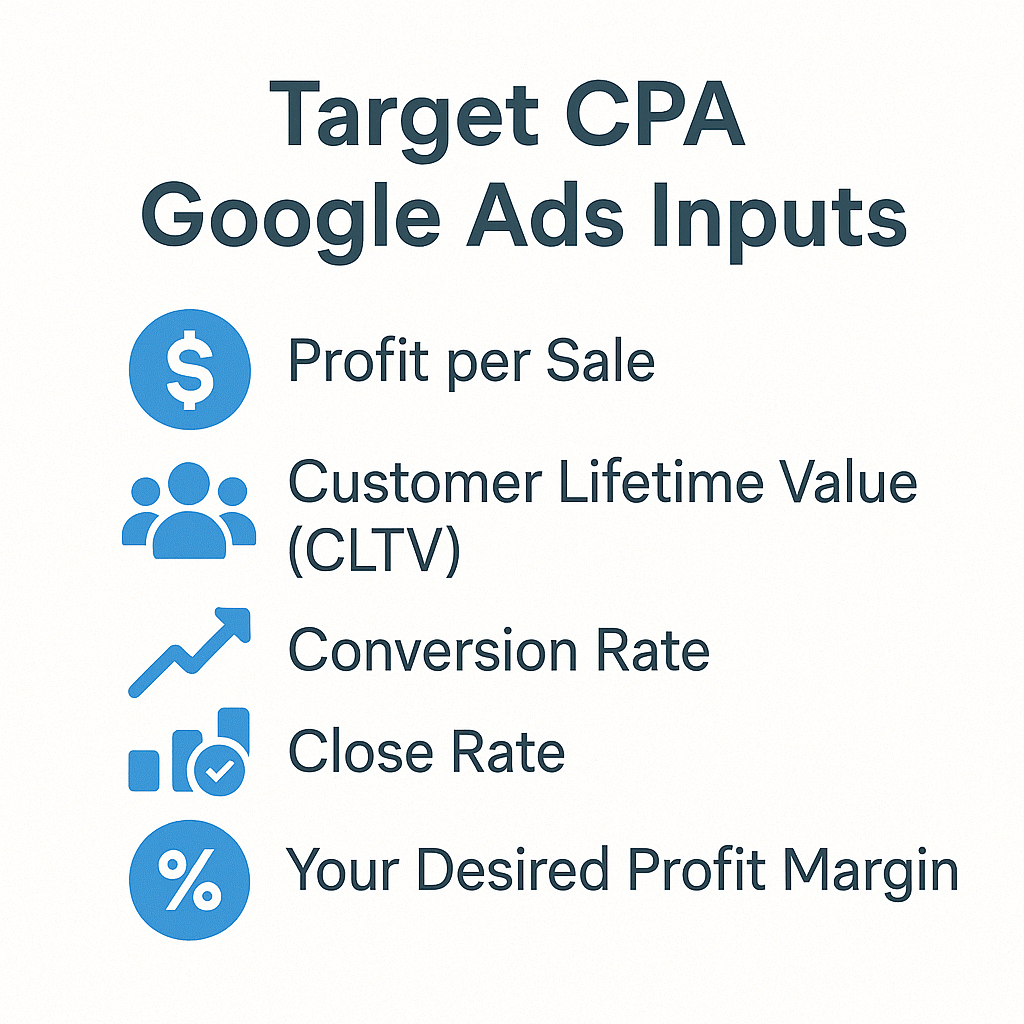
Before we jump into the formula, let’s gather our ingredients. Calculating a data-driven target CPA isn’t guesswork; it’s a simple recipe that requires a few key numbers from your business. Don’t worry, we’ll break down how to find each one.
Here’s what you’ll need:
- Profit per Sale or Customer Lifetime Value (CLTV): How much actual profit a new customer brings in.
- Conversion Rate and Close Rate: The two critical percentages that connect a click to a paying customer.
- Your Desired Profit Margin: How much of that profit you want to keep after ad costs.
Let’s dig into each of these components.
Profit per Sale or CLTV in How to Calculate Target CPA Google Ads
This is your starting point. You can’t know what you can afford to spend if you don’t know what a customer is worth.
Profit per Sale: This is not your revenue; it’s the bottom-line profit you make from a single transaction. The formula is simple:
Profit per Sale = Average Sale Value − Cost to Deliver the Service or Product
For a service business, like a roofer, if the average roofing job is $10,000 and the cost of materials and labor is $7,000, the Profit per Sale is $3,000. That $3,000 is the absolute maximum you could possibly spend to acquire that customer just to break even.
Customer Lifetime Value (CLTV): This is a more advanced (and powerful) metric. It’s the total profit you expect to earn from an average customer over the entire time they do business with you. This is crucial for businesses with repeat clients, like dentists, cleaning services, or marketing agencies. A new dental patient might be worth $300 for their first cleaning, but over five years of regular check-ups, they could be worth thousands in profit.
Which one to use? If you’re just starting out or your business is mostly one-off sales, stick with Profit per Sale. If you have a repeat business model and the data to back it up, using CLTV will allow you to set a more aggressive (and ultimately more scalable) target CPA.
Conversion Rate and Close Rate in How to Calculate Target CPA Google Ads
This is where many advertisers get tripped up. There are two „conversion rates” you need to understand, and they measure two different things.
- Website Conversion Rate (CVR): This happens on your website. It’s the percentage of people who click your ad and then complete the desired action (the „conversion”), like filling out a contact form or calling you. You find this number directly in your Google Ads account. Website CVR=(Number of Leads from Ads/Total Clicks)∗100%
- Sales Close Rate (or Lead-to-Customer Rate): This happens after the lead is generated. It’s the percentage of leads that your sales process successfully turns into paying customers. This number comes from your CRM, sales spreadsheets, or even just manual tracking. Close Rate=(Number of New Customers/Total Leads)∗100%
You need both because they form a chain. If your website converts 5% of clicks into leads, and your sales team closes 20% of those leads, you can figure out how many clicks you need to get one paying customer. It tells the full story from click to cash.
Desired Profit Margin to Calculate Target CPA in Google Ads
You’re in business to make money, not just to break even on your ad spend. The desired profit margin is the portion of your Profit per Sale that you want to keep in your pocket after all advertising costs are paid.
This is a strategic business decision. Do you want to reinvest aggressively, aiming for a lower margin (e.g., 20%) to fuel rapid growth? Or do you want to maximize profitability on every sale with a higher margin (e.g., 50-60%)?
For example, if your Profit per Sale is $1,000 and you decide you want to maintain a 40% profit margin, that means you want to keep $400 as pure profit. The remaining 60%, or $600, is the maximum amount you’re willing to spend on marketing to acquire that single customer. This $600 becomes the foundation of your target CPA calculation.
Set Up Conversion Metrics for How to Calculate Target CPA Google Ads
Theory is great, but it’s useless without accurate data. To calculate a meaningful target CPA, you first need to be a meticulous tracker. As the saying goes, „what gets measured, gets managed,” and in Google Ads, what gets measured gets optimized.
This means setting up conversion tracking that tells the whole story, from the initial click to the final sale. There are two parts to this puzzle:
1. Tracking Online Leads (In Google Ads)
This is the first and most fundamental step. You need to track every time a user performs a valuable action on your website after clicking your ad. This is your „lead.” For most service businesses, this includes:
Form Submissions: When a user fills out your „Contact Us” or „Get a Quote” form.
Outbound Clicks: When a user clicks your phone number on a mobile device („click-to-call”) or clicks your email address.
Chat Initiations: If you use a live chat widget, you can track when a conversation is started.
How to set it up: The most robust and flexible way is using Google Tag Manager (GTM). It allows you to set up these tracking „tags” without having to edit your website’s code for every change. Alternatively, you can place the Google Ads tag directly on your website. The important thing is that every single lead is being counted within the Google Ads platform. This data feeds the algorithm for your target CPA bid strategy.
2. Tracking Offline Sales (The Secret Sauce)
This is the step that separates the amateurs from the pros. A lead is great, but a paying customer is what matters. Most sales for service businesses don’t happen online; they happen over the phone, via email, or after an in-person consultation. You must find a way to tell Google which of those online leads turned into actual revenue.
This is done using Offline Conversion Tracking (OCT).
Here’s how it works in a nutshell:
- When a user clicks your ad, Google assigns a unique ID to that click, called a GCLID (Google Click Identifier).
- You configure your website form to capture this GCLID along with the user’s contact information and save it in your CRM or spreadsheet.
- When your sales process works its magic and that lead becomes a customer, you take the GCLID associated with that lead and upload it back into Google Ads, marking it as a „Sale.” You can even include the actual revenue value!
Why is this a game-changer? Because it teaches Google’s AI not just what kind of user fills out a form, but what kind of user actually pays you money.
Over time, the algorithm gets smarter, prioritizing users who are more likely to become profitable customers, not just leads.
How to Use a target CPA Calculator Online to Calculate Target CPA in Google Ads
Alright, you understand the inputs and you’ve set up your tracking. Now it’s time for the fun part: putting it all together to get your magic number. While the math isn’t complex, using a target CPA calculator simplifies the process and eliminates errors.
(We’ve created a free, easy-to-use downloadable calculator for you right here!)
Let’s walk through the formula the calculator uses so you understand the logic behind it.
The formula to determine your target CPA for a lead is:
Target CPA (per lead)=(Average Profit per Sale×Sales Close Rate)×(1−Desired Profit Margin)
Let’s break that down with a real-world example. Imagine you’re a business consultant.
Your numbers are:
- Average Profit per Sale: $3,000
- Sales Close Rate: 20% (meaning you close 1 out of every 5 qualified leads)
- Desired Profit Margin: 50% (you want to keep half the profit after ad costs)
Let’s calculate:
- First, find the break-even value of a single lead: This tells you the maximum you could ever pay for a lead without losing money. Average Profit per Sale×Sales Close Rate=Value of a Lead $3,000×20%=$600 This means each lead is, on average, worth $600 in potential profit to your business.
- Next, apply your desired profit margin: You don’t want to just break even, you want to profit! So, we calculate how much of that lead value you’re willing to spend on ads. Value of a Lead×(1−Desired Profit Margin)=Target CPA $600×(1−50%)=$600×0.50=$300
Your Target CPA is $300.
This is the number you will enter into Google Ads. It tells the algorithm: „Google, go find me qualified leads, and I am willing to pay up to $300 for each one because I know, based on my data, that this price will make my campaigns highly profitable.”
Quick Method with Past Data to Calculate Target CPA in Google Ads
If your campaign has been running for a while and already has conversion data, you can use that history to set a realistic starting point for your target CPA. This method is fast, straightforward, and grounded in your account’s actual performance.
Warning: This method is only useful if your conversion tracking is accurate!
Here’s how to do it:
- Go to your Google Ads account. Navigate to the „Campaigns” view.
- Set your date range. Choose a period that reflects typical performance, like the „Last 30 days” or „Last 90 days.” Avoid periods with major sales or unusual events.
- Look at the Cost / conv. column. This metric shows you exactly what you have historically paid, on average, for one conversion (a lead).
An example:

Now, you have your historical CPA. The next question is crucial: Was your campaign profitable at this cost?
- Scenario A: Yes, it was profitable. Fantastic! Your historical Cost / conv. is a proven, effective CPA. You can confidently set your initial target CPA at this level, or even slightly higher (5-15%) to give the algorithm some breathing room to find more conversions.
- Scenario B: No, I was breaking even or losing money. This is also valuable data. It tells you that your current lead cost is too high. You need to set your target CPA lower than your historical Cost / conv. to steer your campaign towards profitability. For example, if you were paying $80 per lead but needed to pay $50 to be profitable, you would set your new target CPA at $50.
This quick method is an excellent way to get started with the target CPA bid strategy by using real-world data from your own account.
Profit-Based Target CPA Formula for How to Calculate Target CPA Google Ads
While the historical data method is a great starting point, the profit-based formula is the gold standard. It doesn’t look at what you did pay; it calculates what you should pay to guarantee profitability. This approach builds your marketing strategy on a solid foundation of your actual business economics.
Let’s formally lay out the formula we’ve been building towards.
The Ingredients You Need:
- Your Average Profit per Sale
- Your Sales Close Rate (as a decimal, e.g., 25% = 0.25)
- Your Desired Profit Margin (as a decimal, e.g., 40% = 0.40)
The Complete Profit-Based Formula:
Target CPA=(Average Profit per Sale×Sales Close Rate)×(1−Desired Profit Margin)
Let’s use an example of a home renovation contractor to illustrate.
- Average Profit per Project: $8,000
- Sales Close Rate: 10% (they turn 1 in 10 leads into a project)
- Desired Profit Margin: 50% (they want half of the profit to remain after ad spend)
Calculation Steps:
- Calculate the break-even value of one lead: $8,000 (Profit)×0.10 (Close Rate)=$800 This means each lead is worth a maximum of $800 to the business.
- Apply the profit margin to find your Target CPA: $800 (Lead Value)×(1−0.50) (Profit Margin)=$400
Your Target CPA is $400.
By using this formula, you are proactively telling Google the exact price per lead that works for your business model. You’re not guessing or reacting; you’re dictating the terms for your profitability.
Set Up Target CPA Bidding in Google Ads After You Calculate Your Target
You’ve done the hard work, you’ve run the numbers, and you have your magic target CPA. Now, it’s time to put it to work. Implementing the target CPA bid strategy in your campaign is straightforward.
Here’s the step-by-step playbook:
1. Log in to your Google Ads account.

2. Navigate to the campaign you want to change.
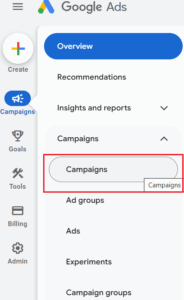
3. Click on the „Campaign Settings” in the left-hand campaign menu.

4. Open the „Bidding” section and click on „Change bid strategy”.
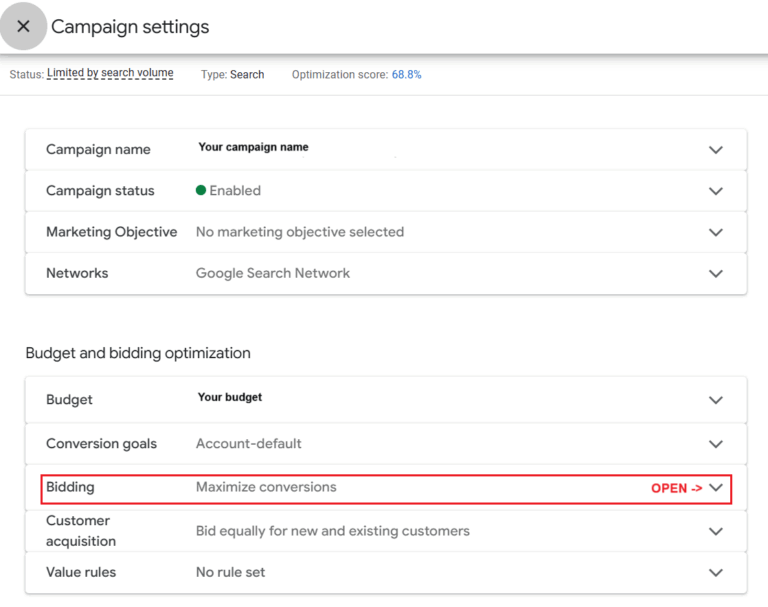

5. A pop-up menu will appear. Select „Set a target cost per action” from the list
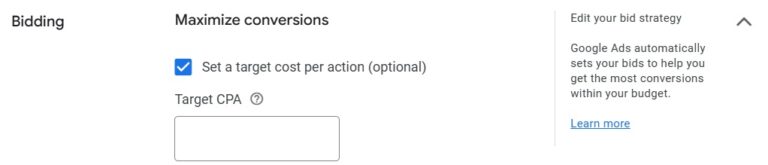
6. You will see a field to enter a target cost per action. Input the „Target CPA” figure you just calculated.
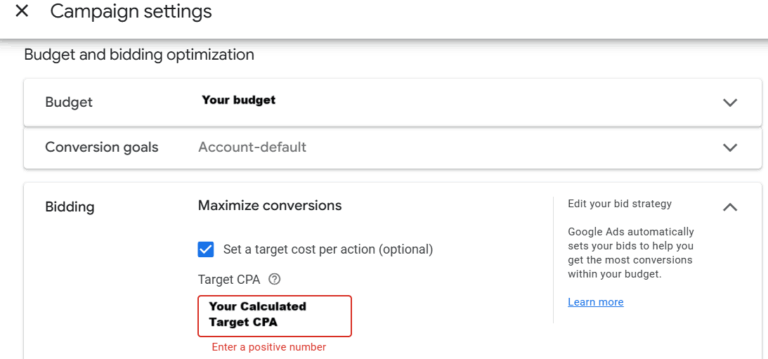
7. Click „Save”.
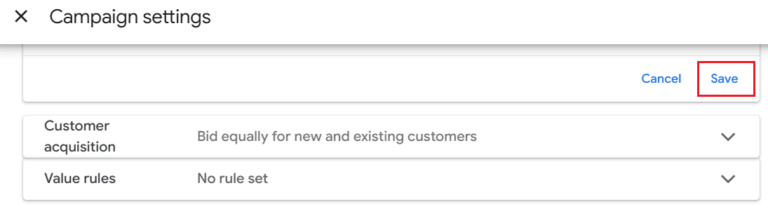
Crucial Pro Tip: Once you save, the campaign will enter a „learning period,” which typically lasts 5-7 days. During this time, Google’s algorithm is calibrating and learning how to achieve your goal. Performance might fluctuate. Do not panic and do not make major changes during this phase! Let the machine learn.
Adjust Your Target CPA Over Time After You Calculate It in Google Ads
Your target CPA is a powerful tool, not a stone tablet. It’s a living number that should evolve with your campaign performance and business goals. The goal is to find the sweet spot between profitability (CPA) and volume (number of leads).
Here’s when and how to adjust your target:
Consider Lowering Your Target CPA if:
- You want to increase profitability: If your campaign is consistently hitting your Target CPA and you have room to be more efficient, try lowering your target by 10-15%. This can decrease your cost per lead, increasing your overall ROI.
- Your business metrics change: If your sales close rate drops or your profit per sale decreases, you must lower your target CPA to maintain profitability. Rerun the profit-based formula with your new numbers.
Consider Raising Your Target CPA if:
- You want to scale and get more leads: Is your campaign consistently missing out on impression share due to your bid? Are you not spending your full daily budget? Raising your target CPA by 10-15% tells Google you’re willing to pay more to enter more auctions. This can significantly increase your lead volume, which is essential for growth.
Remember to make changes incrementally. Drastic shifts can shock the algorithm and reset the learning period. Make a small adjustment, wait a week, analyze the results, and then adjust again if needed.
Compare Target CPA with Manual CPC and Other Strategies When You Calculate Target CPA in Google Ads
Target CPA is a fantastic strategy, but it’s one of many tools in the Google Ads toolbox. Here’s how it stacks up against other common bidding strategies:
- Target CPA: This is your go-to for profitable automation. You tell Google your goal, and its AI uses countless real-time signals (device, location, time of day, user intent) to find conversions at your desired cost. It requires a history of conversion data to work effectively.
- Manual CPC: This is the strategy for maximum control. You set the maximum bid for every single keyword. It’s great for brand new campaigns where you need to gather data or for advertisers who want to manage every detail. However, it’s incredibly time-consuming and can’t compete with the AI’s real-time optimisation capabilities.
- Maximize Conversions: This strategy’s goal is maximum volume. It will try to get you the most leads possible within your daily budget, without any regard for the cost of each one. It can be useful for launching a campaign to quickly gather data, but be warned: if you don’t watch it carefully, your CPA can skyrocket. A good tactic is to run Maximize Conversions for a few weeks, then use the resulting historical CPA to set a target CPA.
- Maximize Conversion Value (tROAS): This is the next level up from target CPA. If you’re able to pass back actual revenue data for each conversion (essential for e-commerce and very powerful for service businesses using Offline Conversion Tracking), this strategy optimises for total profit, not just lead volume.
Improve Campaigns to Hit Your Calculated Target CPA in Google Ads
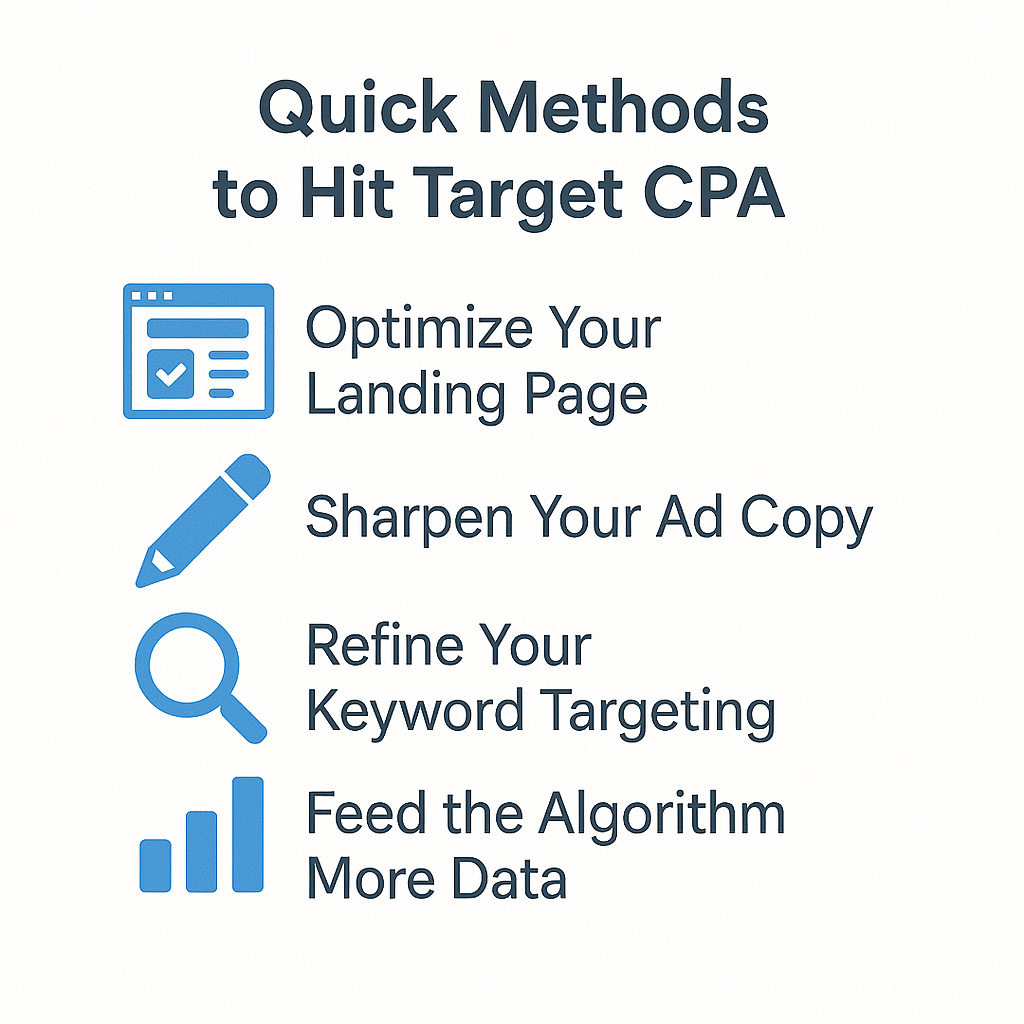
Setting a target CPA tells Google what you want to achieve, but the quality of your campaign determines if it can be achieved. If you’re struggling to hit your target, don’t just blame the bid strategy. Look at improving the fundamental components of your campaign.
Here are the biggest levers you can pull:
- Optimize Your Landing Page: This is the most powerful factor. A higher landing page conversion rate directly lowers your CPA. If your page converts at 2% and you improve it to convert at 4%, you’ve just cut your cost per lead in half without even touching the bid. A/B test headlines, calls-to-action, forms, and social proof.
- Sharpen Your Ad Copy: Write compelling ads that speak directly to the user’s problem. A higher Click-Through Rate (CTR) leads to a better Quality Score, which means Google gives you a discount on your clicks. Test different headlines and descriptions constantly.
- Refine Your Keyword Targeting: A great bid strategy can’t fix bad targeting. Aggressively add negative keywords to eliminate wasted spend on irrelevant searches. Pause or remove keywords that have a high cost and low conversion rate. Focus your budget on the proven winners.
- Feed the Algorithm More Data: Smart Bidding thrives on data. The more conversions you have (ideally 30+ in the last 30 days), the better it works. If your volume is low, consider tracking „softer” micro-conversions (like video views or PDF downloads) as secondary goals to give the algorithm more signals to learn from
Improve Your Lead Capture Page and Funnel to Meet Your Calculated Target CPA
Your bid strategy can only do so much. The most significant gains in lowering your CPA often come from what happens after the click. Your landing page is your 24/7 salesperson, and it needs to be exceptional.
Remember the math: if you improve your website conversion rate from 3% to 6%, you have effectively cut your cost per lead in half.
Here’s how to do it (this is the world of Conversion Rate Optimisation – CRO):
- Create Unbeatable Message Match: The headline on your landing page must directly reflect the promise made in your ad. If your ad says „Emergency Roofing Repair,” your landing page headline can’t be „Quality Home Services.”
- Simplify Your Lead Form: Only ask for the information you absolutely need. Every extra field you ask a user to fill out will lower your conversion rate. Name, email, phone, and a comment box are often enough.
- Use a Crystal Clear Call-to-Action (CTA): Your button should be bright, obvious, and use action-oriented text. „Get My Free Quote” is much better than „Submit.”
- Build Trust with Social Proof: Display your best testimonials, case studies, Google reviews, and industry certification logos prominently. Prove to visitors that others have trusted you and had a great experience.
- Ensure it’s Flawless on Mobile: The vast majority of your traffic will likely come from mobile devices. Test your page on your phone. Is it fast? Is the text easy to read? Is the form easy to fill out with your thumbs?
Use High-Intent Keywords to Achieve Your Target CPA in Google Ads
Not all keywords are created equal. Your ability to hit your target CPA depends heavily on focusing your budget on users who are ready to take action, not just doing research.
Think about the user’s intent:
- Low Intent (Informational): „how to fix a shingle,” „roofing materials,” „DIY roof repair.” These users want information, not a service.
- High Intent (Transactional): „roofer near me,” „get roofing estimate łódź,” „emergency plumber cost,” „local HVAC service.” These users have a problem and are actively looking for a professional to hire.
Your Action Plan:
- Audit Your Search Terms Report: Find out what people are actually typing to trigger your ads.
- Focus Budget on Winners: Shift your budget towards keywords that include transactional modifiers like „quote,” „service,” „cost,” „near me,” or a specific city name.
- Be a Negative Keyword Ninja: Aggressively add negative keywords to block searches from job seekers („jobs,” „career”), DIYers („how to,” „tutorial”), and price shoppers looking for freebies („free”). This is one of the fastest ways to cut wasted spend.
Optimise by Location, Time and Device for Your Calculated Target CPA in Google Ads
While the target CPA algorithm automatically considers many signals, you can guide it by analyzing your own data and applying strategic bid adjustments. Check the Locations, Ad schedule, and Devices tabs in your campaign.
- Device Optimisation: Do you find that users who convert on a desktop are more valuable than mobile users? Or do all your leads come from „click-to-call” on phones? If you see a clear performance difference, you can apply a bid adjustment (e.g., +15% for your best-performing device type) to tell Google to prioritize that segment.
- Location Optimisation: Are leads from a specific wealthy suburb more profitable? Are you getting junk leads from a city outside your service area? Exclude underperforming locations and apply positive bid adjustments to your money-making zones.
- Time & Ad Schedule Optimisation: If you’re a B2B service, running ads at 2 AM on a Sunday might be a waste of money. Analyze your „Day & hour” report. If you see that conversions are cheaper and more plentiful during business hours, create an ad schedule that focuses your budget on those peak times.
Leverage Audience Segments to Hit Your Calculated Target CPA in Google Ads
Layering audiences onto your Search campaigns is like giving your target CPA strategy superpowers. It allows you to tell Google that some users are more valuable to you than others.
Add these audiences to your campaigns in „Observation” mode first. This lets you collect data without restricting your reach.
- Remarketing Lists for Search Ads (RLSA): This is your most powerful audience. A user who has already visited your website is a much warmer lead. Create an audience of „All website visitors (30 days)” and apply a +25% bid adjustment. You’re telling Google you’re willing to bid more to bring that person back.
- In-Market Audiences: Target users who Google’s data shows are actively researching the products or services you offer (e.g., „In-market for Business Services > Advertising & Marketing Services”).
- Customer Match: Upload a list of your past customers. You can either use this to exclude them from lead generation campaigns (saving money) or create Similar Audiences to find new users who behave like your best customers.
Once you have data, you can apply bid adjustments to the most profitable segments, giving your target CPA algorithm even better signals to work with.
Common Mistakes and How to Avoid Them When You Calculate Target CPA in Google Ads
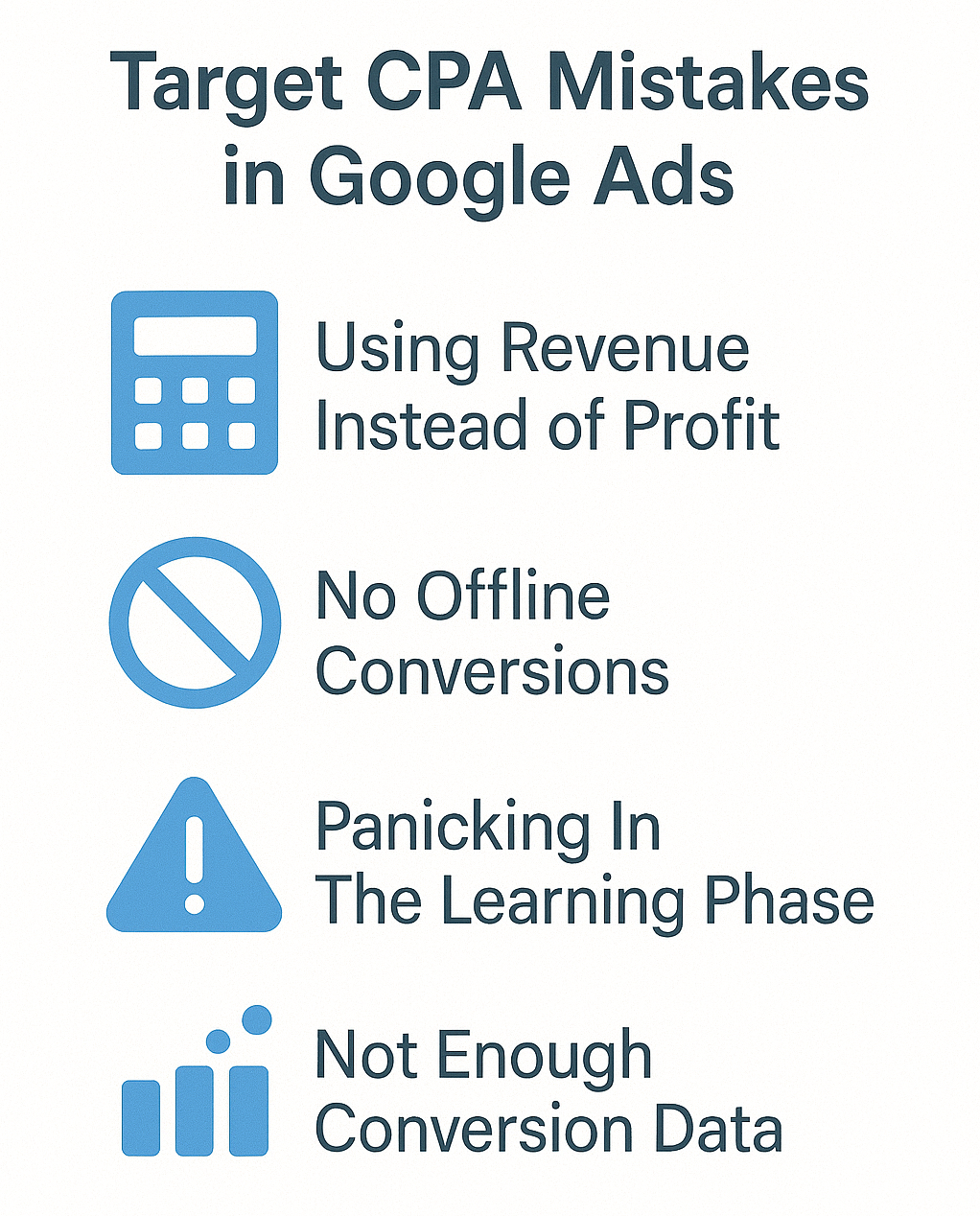
Knowing the formula is one thing; applying it flawlessly is another. Many advertisers stumble on their way to CPA mastery. Here are the most common mistakes and how you can sidestep them:
- Using Revenue Instead of Profit: This is the cardinal sin. Calculating your CPA based on a $1,000 sale when your profit is only $300 will lead you to overpay drastically.
- How to avoid it: Always subtract your cost of goods sold (COGS) or cost of service delivery before you begin any calculation. Base your CPA on pure profit.
- How to avoid it: Always subtract your cost of goods sold (COGS) or cost of service delivery before you begin any calculation. Base your CPA on pure profit.
- Forgetting to Track Offline Sales: You celebrate getting 10 leads from Google Ads, but you don’t know that only 1 of them actually became a paying customer.
- How to avoid it: Implement a CRM or even a simple spreadsheet to track which leads convert to sales. This allows you to calculate your true Sales Close Rate, the most critical part of the formula.
- How to avoid it: Implement a CRM or even a simple spreadsheet to track which leads convert to sales. This allows you to calculate your true Sales Close Rate, the most critical part of the formula.
- Panicking During the Learning Period: You launch your tCPA strategy, and on day two, performance looks weird. You panic and start making changes.
- How to avoid it: Patience! Google’s algorithm needs 5-7 days (sometimes more) to learn. Let it run without interference for at least a week to allow it to stabilize.
- How to avoid it: Patience! Google’s algorithm needs 5-7 days (sometimes more) to learn. Let it run without interference for at least a week to allow it to stabilize.
- Not Having Enough Conversion Data: You try to use target CPA on a brand new campaign with only 2 conversions in the last month. The algorithm has no data to learn from and will perform poorly.
- How to avoid it: Before switching to target CPA, ensure your campaign is generating at least 15, and ideally 30+, conversions per month. Use Maximize Conversions to build up this initial data if needed.
Align Target CPA with Customer Lifetime Value When You Calculate Target CPA in Google Ads
For many service businesses, the first sale is just the beginning of the customer relationship. This is where calculating your CPA based on Customer Lifetime Value (CLTV) becomes a game-changing strategy.
Think of it like an iceberg. The first sale is the visible tip, but the true value (repeat business, upsells, referrals) is the massive chunk of ice below the surface.
Who should use a CLTV-based CPA? Businesses with a repeat customer model:
- Dentists & Chiropractors (regular check-ups)
- Cleaning & Landscaping Services (monthly/seasonal contracts)
- Marketing Agencies & Consultants (retainers)
- SaaS businesses (subscriptions)
By using CLTV, you can justify a higher initial target CPA. You might be willing to break even on the first appointment if you know that the average client will stay with you for three years, generating thousands in profit. This allows you to outbid and acquire more customers than your short-sighted competitors.
Real-World Examples to Calculate Target CPA in Google Ads
Let’s make this tangible with three different business scenarios.
Example 1: The Local Plumber
- Average Profit per Job: $500
- Sales Close Rate: 20% (closes 1 in 5 leads)
- Desired Profit Margin: 50%
- Calculation: ($500 * 0.20) * (1 – 0.50) = $100 * 0.50 = $50 target CPA
Example 2: The B2B Marketing Agency
- Average Profit per Client (Year 1): $10,000
- Sales Close Rate: 10% (closes 1 in 10 qualified leads)
- Desired Profit Margin: 40%
- Calculation: ($10,000 * 0.10) * (1 – 0.40) = $1,000 * 0.60 = $600 target CPA
Example 3: The Chiropractic Clinic (CLTV Model)
- Average 2-Year Patient Lifetime Value (Profit): $2,000
- New Patient Close Rate: 40% (closes 2 in 5 leads from the website)
- Desired Profit Margin: 60%
- Calculation: ($2,000 * 0.40) * (1 – 0.60) = $800 * 0.40 = $320 target CPA
Advanced Tips and Best Practices for How to Calculate Target CPA Google Ads
Ready to move from proficient to pro? Here are some advanced best practices:
- Use Portfolio Bid Strategies: If you have multiple campaigns with the same CPA goal, grouping them in a portfolio strategy allows them to share learnings, which can improve performance and speed up the learning period.
- Set a Campaign-Level Target First: Don’t overcomplicate things by setting different CPA targets for every ad group. Start at the campaign level. This pools your data, giving the algorithm more to work with.
- Feed the Beast with Data: The #1 way to empower target CPA is to feed it better data. This means implementing Offline Conversion Tracking to tell Google which clicks led to actual sales, not just leads.
- Bid Strategy is Not a Magic Wand: Remember that no bid strategy can fix a bad offer, a terrible landing page, or a broken sales process. Your CPA target must be supported by a solid business foundation.
Free CPA Calculator for How to Calculate Target CPA Google Ads
We’ve covered a lot of numbers and formulas. To make your life easier and ensure you get this right every time, we’ve built a simple tool to do the heavy lifting for you.
This plug-and-play calculator will take your business inputs—profit per sale, close rate, and desired margin—and instantly give you the data-driven target CPA you should be using in your campaigns.
No more guesswork. No more spreadsheets from scratch. Just profitable, predictable results.
[-> Click Here to Download Your Free Google Ads CPA Calculator Now <-]
Conclusion and Next Steps After You Calculate Target CPA in Google Ads
Mastering your Cost Per Acquisition is the single most important step you can take to transform Google Ads from an expense into a predictable, scalable profit center.
You’ve learned why CPA is crucial, how to calculate it based on both historical data and your unique business profitability, and how to implement and optimize your campaigns around that all-important number. The power is now in your hands to move away from hoping for results and start engineering them.
Your Next Steps:
- Download our free CPA Calculator to make the math effortless.
- Audit your conversion tracking. Are you tracking both online leads and offline sales? If not, make that your #1 priority.
- Calculate your profit-based Target CPA for your most important service.
- Implement and test! Choose one key campaign, apply your new target CPA, and let it run for 1-2 weeks.
- Analyze and optimize. Use the advanced strategies in this guide to continuously improve your results.
If you’d rather have an expert handle this for you, you know where to find me.
FAQ: How to Calculate Target CPA Google Ads
What is Target CPA in Google Ads?
Target CPA (Cost Per Acquisition) is a Google Ads Smart Bidding strategy. You set the maximum average cost you’re willing to pay for a conversion (like a lead), and Google’s machine learning automatically adjusts your bids to get you the most conversions at that target cost.
What are the two main methods to calculate Target CPA in Google Ads?
The two primary methods are: 1) The Historical Method, which uses your past campaign data (Total Ad Spend ÷ Conversions), and 2) The Profit-Based Method, which uses your actual business profit and sales data to calculate a target that ensures profitability. The second method is highly recommended.
To properly learn how to calculate target cpa google ads, how should I set up my conversion metrics?
Proper setup is fundamental. You must accurately track online conversions like form submissions and calls within Google Ads. Crucially, you should also track offline sales in a CRM or spreadsheet and import this data back into Google to give the algorithm a complete picture of what turns into real revenue.
How does a free online calculator help with the process of how to calculate target cpa google ads?
A free calculator automates the profit-based formula. It saves you time and reduces the risk of manual error. You simply input your business’s core numbers (profit, close rate, desired margin), and the tool provides a precise, data-driven Target CPA to use in your campaigns.
Is there a quick method using past data for how to calculate target cpa google ads?
Yes, the quick method is to look at your recent campaign history (e.g., the last 30 days) and divide your total ad spend by your total number of conversions. This gives you your historical average CPA, which can be a good starting point if you were profitable at that cost.
What is the specific profit-based formula used for how to calculate target cpa google ads?
The most accurate, profit-based formula is: Target CPA = (Average Profit per Sale × Sales Close Rate) × (1 – Desired Profit Margin). This formula directly connects your advertising goals to your business’s bottom line.
After I learn how to calculate target cpa google ads, what is the key step for setting up my bidding strategy?
The key step is implementation. In your campaign settings, go to „Bidding,” select „Target CPA,” and enter your calculated number. After saving, you must allow for a 1-2 week „learning period” where the algorithm calibrates without interference.
As part of managing my campaign, how do I adjust my bids over time after I calculate target cpa google ads?
You should make small, incremental adjustments (around 10-15%). If you want more leads and can afford a higher cost, raise your Target CPA. If you want to increase profitability and your return on investment, lower your Target CPA.
When I'm deciding how to calculate target cpa google ads, how should I compare it to other strategies like Manual CPC?
Compare them based on your goals and available data. Target CPA is superior for automated, efficient conversions once you have enough data. Manual CPC offers granular control, which is useful for brand new campaigns, but it lacks the real-time optimisation power of AI.
To successfully apply the principles of how to calculate target cpa google ads, how can I improve my campaigns?
To help your bid strategy succeed, you must improve the core components of your campaign. This includes optimising your landing page conversion rate, writing compelling ad copy, using high-intent keywords, and aggressively adding negative keywords to reduce waste.
How does improving my landing page impact the final results when I calculate target cpa google ads?
Improving your landing page has a massive impact. If you double your landing page’s conversion rate, you effectively cut your actual cost per lead in half. This makes it significantly easier for your campaign to achieve its Target CPA goal.
Why are high-intent keywords so important for the strategy of how to calculate target cpa google ads?
High-intent keywords (like „roofer near me” or „get a quote”) are used by people ready to make a purchase. Focusing your budget on these terms leads to a higher conversion rate, which naturally lowers your cost per acquisition and helps you hit your Target CPA profitably.
In the process of learning how to calculate target cpa google ads, how should I optimise by segment (location, time, device)?
You should analyse your campaign’s performance reports for these segments. If you find that certain locations, times of day, or devices (e.g., desktop) convert at a much lower cost, you can apply positive bid adjustments to tell Google’s algorithm to prioritise them.
When applying the method of how to calculate target cpa google ads, how should I leverage audience segments?
You should layer audiences on your campaigns, especially Remarketing Lists for Search Ads (RLSA). By applying a bid adjustment (e.g., +25%) for users who have already visited your site, you signal to Google that these warmer leads are more valuable, helping the algorithm bid more effectively for them.
What common mistakes should I avoid when I learn how to calculate target cpa google ads?
Avoid using revenue instead of profit for your calculation, forgetting to track your offline sales close rate, making reactive changes during the algorithm’s learning period, and trying to use the Target CPA strategy without sufficient conversion data (aim for 30+ in 30 days).
For an advanced approach to how to calculate target cpa google ads, how do I align my strategy with Customer Lifetime Value (CLTV)?
For businesses with repeat clients, you should use CLTV instead of a single sale’s profit in your calculation. This allows you to set a higher, more competitive Target CPA because you are optimising for a customer’s long-term value, not just their first transaction.
Can you provide real-world examples of how to calculate target cpa google ads?
Of course. A consultant with a $5,000 profit per project, a 10% sales close rate, and a 50% desired profit margin would calculate their target as follows: ($5,000 * 0.10) * (1 – 0.50) = $250 Target CPA
What are the advanced tips and best practices for how to calculate target cpa google ads?
Advanced best practices include using Portfolio Bid Strategies to share data across campaigns, implementing Offline Conversion Tracking to feed the algorithm real sales data, and focusing on improving your ad creatives and landing page experience to support your bidding goals.
Where can I find a free calculator for how to calculate target cpa google ads?
This article provides a link to our free, downloadable calculator. It is the easiest way to apply the profit-based formula correctly and get a data-driven Target CPA for your campaigns in minutes.
What are the next steps after I learn how to calculate target cpa google ads?
The next steps are action-oriented: 1) Audit your conversion tracking setup for accuracy. 2) Calculate your number using the profit-based formula or our calculator. 3) Implement the Target CPA bid strategy in a key campaign. 4) Monitor performance for a few weeks and make small adjustments as needed.

Daniel Ostrzyzek
Hi, I’m Daniel Ostrzyzek, a passionate Google Ads specialist with over 8 years of experience. I work with small to medium-sized businesses to help them attract leads, achieve their growth goals, and maximize ROI through Google Ads campaigns. After discovering my passion for digital marketing, I dove deep into Google Ads. Over the years, I’ve gained valuable experience working with businesses across various industries. I specialize in Google Ads Search and lead generation campaigns, helping my clients maximize the results of their online advertising.

Let's Talk!
I’m here to help you grow your business with the power of Google Ads. If you’re ready to take your campaigns to the next level – Schedule My Free Consultation