
Top 5 Google Ads Mistakes in Service Business
- Published:2025-11-14
- Updated: 2025-11-25
Top 5 Google Ads Mistakes in Service Business
I’ve analyzed a lot of Google Ads accounts for service businesses, and most of them are making the same five mistakes. These aren’t tiny details—they are big, costly errors that quietly eat up thousands of dollars every single month.
Running Google Ads can be a goldmine for businesses like plumbers, HVAC contractors, and dentists who rely on local leads and phone calls. But it’s a double-edged sword. Unlike an e-commerce store, your business relies on local targeting and capturing high-intent leads like phone calls and appointments. Without the right setup, you end up paying for clicks that never convert, essentially burning your money. Industry reports even estimate that a significant portion of ad budgets is wasted.
This guide will show you exactly what those Google Ads mistakes are and, more importantly, how to fix them to stop wasting money on ads that don’t work.
Contents
- 1. Top 5 Google Ads Mistakes in Service Business
- 1.1. Top 5 Google Ads Mistakes in Service Business
- 1.2. Watch My Video I Created for You — Top 5 Google Ads Mistakes in Service Business
- 1.3. 1. The "Failing to Track" Google Ads Mistake
- 1.4. 2. The "Broad Location Targeting" Google Ads Mistake
- 1.5. 3. The "Wrong Keywords & Match Types" Google Ads Mistake
- 1.6. 4. The "Generic Ad Copy" Google Ads Mistake
- 1.7. 5. The "Homepage Landing Page" Google Ads Mistake
- 1.8. Bonus Mistake: Neglecting Local Extensions & Settings
- 1.9. Stop Wasting Money and Start Getting Leads
- 1.10. FAQ: Top 5 Google Ads Mistakes in Service Business
- 1.10.1. What is the most common Google Ads mistake for small businesses?
- 1.10.2. How does the "broad location targeting" Google Ads mistake waste money?
- 1.10.3. Is using only broad match keywords a bad Google Ads mistake?
- 1.10.4. Can a generic ad be considered a costly Google Ads mistake?
- 1.10.5. Why is sending traffic to my homepage a Google Ads mistake?
- 1.10.6. What is a Google Ads mistake related to bidding?
- 1.10.7. Is following Google's recommendations without checking what they are a Google Ads mistake?
- 1.10.8. How much money can a single Google Ads mistake cost me?
- 1.10.9. What is a Google Ads mistake specific to local service businesses?
- 1.10.10. How do I fix the "wrong keywords" Google Ads mistake?
- 1.10.11. Daniel Ostrzyzek
- 1.11. Let's Talk!
Watch My Video I Created for You — Top 5 Google Ads Mistakes in Service Business
Key Takeaways
For those in a hurry, here are the top 5 Google Ads mistakes service businesses make:
- No or Wrong Conversion Tracking: You don’t know which ads, keywords, or campaigns actually generate calls and leads.
- Broad Location Targeting: You’re paying for clicks from people who live too far away to ever become customers.
- Wrong Keywords & Match Types: Your ads show for irrelevant searches, wasting money on junk traffic.
- Generic Ad Copy: Your ads are boring and look like everyone else’s, so users skip right over them.
- Sending Traffic to the Homepage: You send interested clicks to your general homepage—a „busy lobby”—instead of a specific landing page that’s built to convert.
1. The "Failing to Track" Google Ads Mistake
This one is huge. It’s the single most common—and the most expensive—Google Ads mistake I see in service business accounts.
If you don’t track what actually turns into a real lead, a phone call, or a booked appointment, you have no idea what’s working. You are effectively flying blind, just spending money and hoping for the best.
I’ve audited accounts that have been running for months, spending thousands of dollars, with zero conversion tracking set up. The business owners thought their campaigns were doing „okay” because they saw clicks, but they couldn’t be sure. When we finally set up proper tracking, it became obvious that most of their budget had gone to clicks that never converted into a single customer.
You’re not just wasting money; you’re also feeding Google’s algorithm bad data. If Google Ads doesn’t know which clicks lead to customers, it can’t optimize your campaigns to find more of those customers.
Common Tracking Errors
Failing to track isn’t just about having no tracking. It’s also about tracking the wrong things. Common errors include:
- Tracking „Page Views”: Counting a simple visit to your „contact us” page as a conversion is a critical error. This tells Google that any click is valuable, even if the user never called or filled out a form.
- Not Tracking Phone Calls: For service businesses like plumbers, electricians, or dentists, the phone call is everything. If you’re not tracking calls from your ads, you’re missing your most valuable conversion.
- Ignoring Form Submissions: Failing to track „Get a Quote” or „Book an Appointment” forms means you’re ignoring a primary source of leads.
- Using the Wrong Attribution Window: This can skew your data, making it hard to know which ad truly led to the conversion.
How to Fix It
- Define Your Real Conversions: First, clearly define what counts as a valuable lead for your business. This is not a page view. It’s a phone call, a form submission, or a booked appointment.
- Set Up Google Ads & GA4 Tracking: Make sure Google Ads is tracking these specific actions correctly, either through the conversion tag or by importing your goals from Google Analytics.
- Tag Your Phone Calls: This is non-negotiable for a service business. Use Google’s call forwarding numbers or other methods to track calls from ads.
- Service-Business Pro Tip: For the best results, use dedicated call-tracking software. This allows you to see which specific keyword led to a phone call. Integrating this with your CRM (Customer Relationship Management) software is even better, as it lets you track which calls turned into actual paying jobs, giving you a true Return on Ad Spend (ROAS).
Once you can see exactly which campaigns, ad groups, and keywords actually bring in leads, optimizing your account becomes infinitely easier.
2. The "Broad Location Targeting" Google Ads Mistake
This is a subtle but incredibly costly Google Ads mistake that wastes a significant amount of budget without business owners even realizing it. For service businesses like plumbers, HVAC contractors, and dentists who rely entirely on local leads, this error is particularly damaging.
I frequently see ads for local service businesses showing up to people who are hundreds of miles away, sometimes even in different states. If your dental practice is located in Miami, you do not want to pay for clicks coming from someone in New York.
Why This Google Ads Mistake Happens
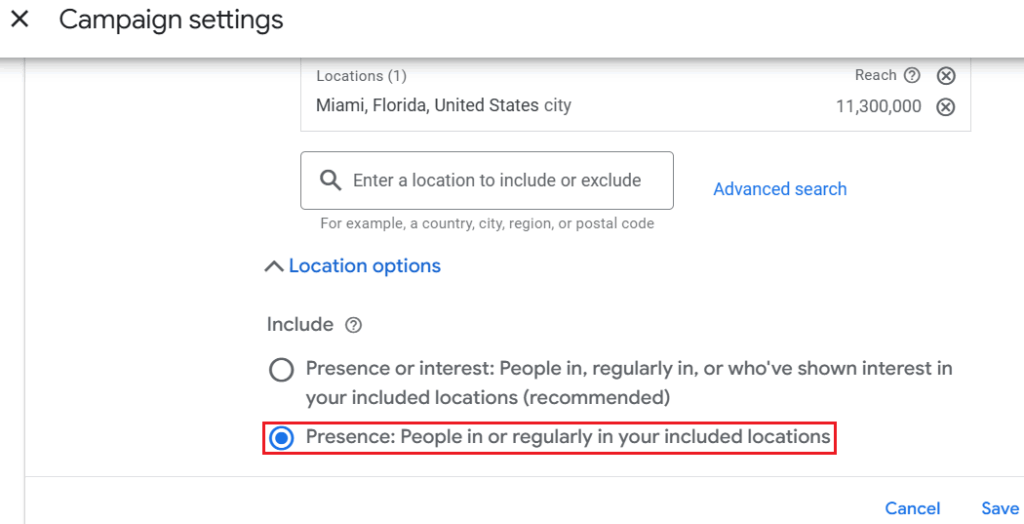
The problem stems from Google’s default location settings. By default, Google targets people who „show interest in” your target area. This means your ad could be shown to anyone, anywhere, who simply searched for something related to your city one time (e.g., „plumbers in Miami” from a user in New York). You end up paying for clicks from people who could never become your clients, wasting your ad spend on irrelevant areas.
How to Fix It
There are two key steps to fixing this:
- Change the Core Location Setting: Go into your campaign’s location settings. Find the „Location options” and change the „Target” setting from the default to “People in or regularly in your target location”. This one change alone will immediately stop a huge amount of wasted clicks.
- Set a Realistic Radius: Keep your targeting radius realistic and aligned with where your actual customers are. If you only serve customers within a 20-mile radius, set your campaign’s radius to 20 miles. You can always expand this later, but it is much safer to start tight.
It is far better to get high-quality, relevant local leads than to get random clicks from people who are out of town.
3. The "Wrong Keywords & Match Types" Google Ads Mistake
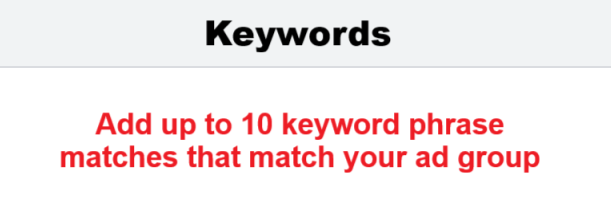
This is another massive money-eater. I once audited an account for a client who had more than 30 random keywords in a single campaign, many of which were not even related to the service they offered. To make matters worse, they had broad matches, phrase matches, and exact matches all mixed together.
The result was predictable: a ton of irrelevant traffic, wasted clicks, and almost no good conversions.
The core of this problem is a misunderstanding of search intent. For a service business, you must target keywords that show a user is looking to hire you, not learn from you. There’s a huge difference between an informational search like „DIY plumbing tips” and a high-intent, commercial search like „plumber near me”.
Many businesses fall into this trap, bidding on generic, high-cost keywords that bring in a lot of clicks but no customers, instead of focusing on long-tail, intent-driven search terms.
How to Fix It
- Start Specific and Focused: The key idea is this: the more focused your keywords, the more qualified your clicks and leads will be. Start specific. For example, instead of a broad, expensive keyword like „dentist,” go with a targeted, long-tail keyword like „dentist in Miami”.
- Understand Match Types: Don’t just dump all your keywords in as „Broad Match.” This is what leads to „match-type missteps” and wasted money.
- Broad Match: Tells Google to show your ad for any search related to your keyword (e.g., your ad for plumber could show for „plumbing school” or „plumber jobs”). This is where most of the „junk traffic” comes from.
- Phrase Match: Shows your ad for searches that include the meaning of your keyword (e.g., „plumber near me” could show for „local plumber near me”).
- Exact Match: Shows your ad only for searches that are the same as, or very close to, your keyword.
- Broad Match: Tells Google to show your ad for any search related to your keyword (e.g., your ad for plumber could show for „plumbing school” or „plumber jobs”). This is where most of the „junk traffic” comes from.
- Build Your Negative Keyword List: This is just as important as your main keyword list. Negative keywords are what block irrelevant searches. If you’re a plumber, you should be adding terms like „DIY,” „jobs,” and „school” to your negative keyword list. This is a critical step to exclude irrelevant searches and is one of the fastest ways to stop wasting money.
4. The "Generic Ad Copy" Google Ads Mistake
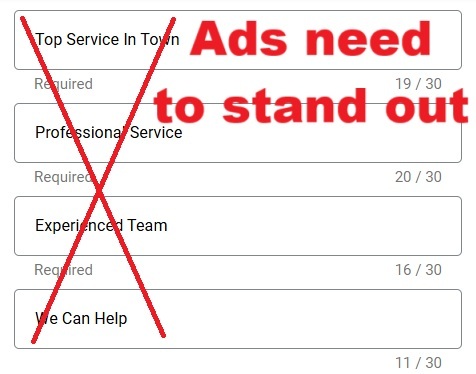
Most small businesses fall into this trap—their ads sound exactly like everyone else’s. You’ve seen them:
- “Top service in town”
- “Professional Service”
- “Experienced Team”
That’s not what gets clicks. This generic ad copy fails because it doesn’t stand out or speak directly to what the customer wants. It blends in with all the other search results, making it easy for a potential customer to skip right over your ad.
How to Fix It
- Match Your Ad to the Search Intent: Your ad needs to be highly relevant to what the person is searching for. If someone searches for „emergency electrician,” your ad headline should say exactly that: “24/7 Emergency Electrician—Power Restored Fast”. That kind of ad feels relevant and urgent, and it directly matches what they are looking for.
- Highlight What Makes You Different: Don’t just say you’re „professional.” Prove it. What makes you the better choice? Do you have 5-star reviews? A fast response time? Do you offer „no call-out fees”? These specific details are what make people click your ad instead of the next one.
- Use Ad Extensions: Don’t forget ad extensions. These make your ad bigger, more detailed, and more clickable. For service businesses, these are critical. Things like call extensions (to get phone calls) , sitelinks (to different services), images, or structured snippets (to list your services) can boost your click-through rate instantly.
5. The "Homepage Landing Page" Google Ads Mistake
This one hurts the most because you might actually be paying for good clicks—people who are genuinely interested in your service—but then you’re sending them to the wrong place to convert.
If your ad talks about a specific service like “Dental Implants,” but the click takes people to your general homepage, you’re losing them right away. This is a classic „landing page misalignment”.
Your homepage talks about everything: all your services, your company history, your blog, etc.. Think of it like this: your homepage is a busy lobby. A landing page, on the other hand, should be a one-on-one meeting. It needs to focus on one single thing: converting that specific visitor.
When someone clicks your ad, they should immediately see the same headline or offer they just clicked on, with one clear call-to-action—like “Schedule a Call” or “Get a Free Quote”.
How to Fix It
- Create Service-Specific Landing Pages: Stop sending traffic to irrelevant pages. If the ad is for „Dental Implants,” the landing page should be only about Dental Implants.
- Use Clear Calls-to-Action (CTAs): The page must have a clear, singular CTA.
- Optimize for Mobile: Many searches for local services happen on a phone. Ensure your landing pages are mobile-friendly and load fast.
- Include Trust Signals: Add elements like testimonials, certifications, or case studies to build credibility.
A Pro Tip: Always Be Testing
Don’t just create a landing page and forget it. Test it. Ongoing A/B testing is one of the most important habits if you want to scale your campaigns.
Change a headline, try a different button color, or move your form higher on the page. These little tweaks can sometimes double your conversion rate without you having to spend a single dollar more on ads. The data will show you exactly what converts before you invest more budget into it.
Bonus Mistake: Neglecting Local Extensions & Settings
This is a bonus mistake tied directly to the unique needs of service businesses. Many advertisers forget to use the ad extensions designed specifically to get local customers.
- Enable Location Extensions: This links to your Google Business Profile and can show your address, phone number, and even your location on a map directly in the ad, which is great if you have a physical office (like a dentist).
- Use Call Extensions: This puts a clickable „Call” button on your ad (on mobile), which is often the primary goal for a service business.
- Use Ad Scheduling: Don’t run ads 24/7 if you can only answer the phone during business hours. Schedule your ads to run when you have someone available to take the call and book the job.
Stop Wasting Money and Start Getting Leads
Those are the five Google Ads mistakes that eat up thousands of dollars every month: no tracking, broad targeting, messy keywords, generic ads, and weak landing pages.
If you’re running Google Ads yourself, fixing even one or two of these can make a huge difference in your lead flow and your budget.
If you’re too busy to manage all these moving parts, that’s completely normal—that’s where bringing in a specialist can save you time and money. If you’d like help with your Google Ads, send me an email and we’ll set up a free call to talk about it—you’ll find everything below.
FAQ: Top 5 Google Ads Mistakes in Service Business
What is the most common Google Ads mistake for small businesses?
The single most common and expensive Google Ads mistake is failing to set up proper conversion tracking. Without it, you are spending money without knowing what ads or keywords are actually generating leads, calls, or appointments.
How does the "broad location targeting" Google Ads mistake waste money?
This mistake wastes money by showing your ads to people outside your service area. Google’s default setting targets people „interested in” your location, meaning someone in New York could see your ad for a Miami-based service, wasting your budget on a click that can never convert.
Is using only broad match keywords a bad Google Ads mistake?
Yes, this is a very common Google Ads mistake. Relying only on broad match keywords (without negative keywords) will show your ads for many irrelevant searches (like „DIY” or „jobs”), leading to wasted clicks from people who are not looking to hire your service.
Can a generic ad be considered a costly Google Ads mistake?
Absolutely. A generic ad that sounds like everyone else’s (e.g., „Professional Service”) is a mistake because it won’t stand out. It fails to speak to the customer’s specific need (like „24/7 Emergency Electrician”) and doesn’t give them a reason to click your ad over a competitor’s.
Why is sending traffic to my homepage a Google Ads mistake?
This is a huge Google Ads mistake because your homepage is too general and not focused on conversion. A user who clicks an ad for a specific service (like „Dental Implants”) should be sent to a dedicated landing page about that one service, with one clear call-to-action.
What is a Google Ads mistake related to bidding?
A common mistake is using the wrong bid strategy for your goals or blindly trusting AI and Smart Bidding without proper conversion data. For example, if your conversion tracking is set up incorrectly, Smart Bidding will optimize for the wrong actions, wasting your budget.
Is following Google's recommendations without checking what they are a Google Ads mistake?
While some recommendations are helpful, many (like „auto-apply” or adding broad match keywords) are designed to increase your ad spend. Always review recommendations critically and only accept those that align with your specific business goals.
How much money can a single Google Ads mistake cost me?
While it varies, a Google Ads mistake like poor targeting or no conversion tracking can easily cost a service business thousands of dollars every month in wasted ad spend.
What is a Google Ads mistake specific to local service businesses?
A common mistake is forgetting to use local extensions. Forgetting to add call extensions, location extensions (if you have an office), and ad scheduling.
How do I fix the "wrong keywords" Google Ads mistake?
You fix this mistake by being specific. Focus on high-intent, long-tail keywords (like „dentist in Miami” instead of just „dentist”) and build a strong negative keyword list to block irrelevant searches like „free,” „DIY,” or „jobs”.

Daniel Ostrzyzek
Hi, I’m Daniel Ostrzyzek, a passionate Google Ads specialist with over 8 years of experience. I work with small to medium-sized businesses to help them attract leads, achieve their growth goals, and maximize ROI through Google Ads campaigns. After discovering my passion for digital marketing, I dove deep into Google Ads. Over the years, I’ve gained valuable experience working with businesses across various industries. I specialize in Google Ads Search and lead generation campaigns, helping my clients maximize the results of their online advertising.

Let's Talk!
I’m here to help you grow your business with the power of Google Ads. If you’re ready to take your campaigns to the next level – Schedule My Free Consultation