
Google Ads for Service Businesses
If you run Google Ads for service business—whether you’re fixing pipes, managing a dental clinic, or installing HVAC systems—you know the biggest challenge isn’t doing the work. It’s finding work.
We have all been there: the dreaded „feast or famine” cycle. One week, your appointment book is full and your team is scrambling. The next week, the phone goes silent, and you are staring at an empty dentist’s chair or an idle work van, wondering where the next customer is coming from.
In the past, you could rely on word-of-mouth, local flyers, or a magnet on a fridge. But consumer behavior has changed forever. Today, when a patient wakes up with a toothache or a homeowner faces a broken furnace, they don’t call a neighbor. They pull out their smartphone and ask Google.
If your business isn’t showing up at that exact moment, you aren’t just missing a lead—you are handing cash directly to your competitor.
This is where Google Ads for service businesses changes the game. Unlike social media ads, where you have to interrupt people scrolling through photos, Google Ads puts you in front of customers who are actively hunting for your solution right now. It is the difference between trying to sell a teeth whitening package to a stranger on the street versus offering it to someone who just walked into your clinic asking for it. However, there is a catch.
Google Ads is a powerful engine, but it doesn’t run on autopilot. We often see practice owners and tradesmen try the „set it and forget it” approach, only to wake up a month later with a drained bank account and zero new bookings to show for it.
In this guide, we will explore the essential strategies that make Google Ads successful for service businesses. We will look at what separates a high-performing campaign from a wasteful one, and how to position your business to attract the right kind of clients.
Ready to stop chasing business and let the right clients find you? Let’s dive in.
Contents
- 1. Google Ads for Service Business
- 1.1. Google Ads for Service Businesses
- 1.2. Why Google Ads for Service Businesses Is the Ultimate Growth Engine
- 1.3. Let's Talk!
- 1.4. Preparing Your Google Ads for Service Business Campaign
- 1.5. Keyword Research Strategies – Google Ads for Service Businesses
- 1.6. Setting Up Your Google Ads Account for Service Business Success
- 1.7. Writing High-Converting Google Ads Copy for Service Business
- 1.8. Optimizing Landing Pages for Google Ads for Service Business Traffic
- 1.9. Local Targeting & Optimization for Google Ads for Service Business
- 1.10. Scaling Your Google Ads for Service Business Revenue
- 1.11. Conclusion: Mastering Google Ads for Your Service Business
- 1.12. FAQ: Google Ads For Service Business
- 1.12.1. Is Google Ads worth it for small service businesses?
- 1.12.2. How much should a service business spend on Google Ads?
- 1.12.3. How long does it take to see results from Google Ads?
- 1.12.4. Google Ads vs. SEO: Which is better for local services?
- 1.12.5. Can I run Google Ads myself, or do I need an agency?
- 1.12.6. Why are clicks in my industry (e.g., Dentistry/HVAC) so expensive?
- 1.12.7. Why am I getting clicks but no phone calls?
- 1.12.8. Will my competitors drain my budget by clicking my ads?
- 1.12.9. What is a "good" conversion rate for a service business?
- 1.12.10. Do I have to sign a long-term contract with Google?
- 1.12.11. Daniel Ostrzyzek
- 1.13. Let's Talk!
Why Google Ads for Service Businesses Is the Ultimate Growth Engine
There is a fundamental difference between advertising on social media and advertising on Google: Intent.
When a potential client sees an ad on Facebook or Instagram, they are likely browsing photos of friends or watching videos; they are being interrupted. When someone searches on Google, they are actively looking for a solution.
For a service business, this distinction is everything. You aren’t trying to convince someone they need a dental implant or a new HVAC system; you are simply raising your hand when they are already asking for one.
Understanding the PPC Model for Service Business Growth
The Pay-Per-Click (PPC) model is often misunderstood as a „slot machine”—you put money in and hope leads come out. In reality, it is a highly controllable financial instrument.
The beauty of PPC for service businesses is that you only pay when a user takes action. You don’t pay for your ad to sit there (impressions); you pay when someone clicks to visit your website or dials your phone number directly from the ad.
This allows for precise reverse-engineering of your revenue:
- If you know a new dental patient is worth $2,000 to your practice.
- And you know you close 20% of the leads you speak to.
- You can mathematically calculate exactly how much you can afford to pay for a click while maintaining a healthy profit margin.
When managed correctly, Google Ads stops being an „expense” and becomes a predictable investment with a clear Return on Ad Spend (ROAS).
Google Local Services Ads (LSA) vs. Google Ads for Service Companies
One of the most common points of confusion we see is between Local Services Ads (LSAs) and traditional Search Ads. While they appear on the same screen, they serve very different strategic purposes.
- Local Services Ads (The „Google Guaranteed” Badge): These appear at the very top of the results with a green checkmark.
- The Pros: They build immediate trust. You pay per lead (call or message), not per click.
- The Cons: You have limited control over targeting. You can’t target specific high-value keywords (like „cosmetic dentistry” specifically); you just target general categories.
- Google Search Ads (Text Ads): These appear just below the LSAs.
- The Pros: Total control. You can write custom ad copy to pre-qualify clients and target very specific needs (e.g., „Emergency AC Repair” vs. „New AC Installation”).
- The Cons: You pay per click, meaning if your website doesn’t convert the traffic, you lose money.
The Strategy: For most high-growth service businesses, the „sweet spot” is often a hybrid approach. You use LSAs to capture the trust-based traffic and Search Ads to capture high-intent, high-value searches that require more explanation.
Key Benefits of PPC Advertising for the Service Sector (Dentist, HVAC)
Google Ads isn’t a one-size-fits-all solution; it adapts to the specific economics of your industry. Here is how it impacts two different high-value sectors:
- For Dental & Medical Practices (High Lifetime Value): The goal here isn’t just volume; it’s patient quality. A generic search for „dentist” might bring in a low-value check-up. But with Google Ads, you can aggressively target high-ticket keywords like „Invisalign cost” or „full mouth implants.” This acts as a filter, bringing you patients searching for premium procedures, maximizing the revenue per chair.
- For HVAC & Home Services (Urgency & Seasonality): Demand in this sector is often driven by urgent need or weather. If a furnace breaks in winter, the homeowner will call the first or second number they see. Google Ads allows you to dominate the top of the page exactly when a storm hits, and then scale back your spend during the shoulder seasons. It gives you the ability to turn the „faucet” of leads on or off based on your team’s capacity.

Let's Talk!
I’m here to help you grow your business with the power of Google Ads. If you’re ready to take your campaigns to the next level – Schedule My Free Consultation
Preparing Your Google Ads for Service Business Campaign
Before you spend a single dollar on clicks, you need a solid foundation. Most business owners skip this stage and jump straight to writing ads—this is the primary reason why so many self-managed campaigns fail within the first month.
To ensure your budget turns into profit rather than just traffic, you need to define the parameters of success clearly. A campaign without a plan is just a donation to Google.
Defining Goals & KPIs for Your Service-Based Google Ads Strategy
It sounds simple, but „getting more business” is not a strategy. You need to be specific about what counts as a win for your practice or company.
We often see a disconnect between Vanity Metrics (what Google shows you) and Business Metrics (what pays the bills).
- Vanity Metrics: Clicks, Impressions, and Click-Through Rate (CTR).
- Business Metrics: Qualified Leads, Cost Per Acquisition (CPA), and Revenue per Patient/Job.
For a premium service business, volume is rarely the only goal. For example, a dental practice might prefer 5 inquiries for high-value cosmetic veneers over 50 inquiries for basic check-ups. Your Key Performance Indicators (KPIs) must reflect profitability, not just busyness. If you aren’t tracking the value of the leads coming in, you are flying blind.
Identifying the Target Audience in Google Ads for Services
Who exactly are you trying to reach? In Google Ads, targeting is often more about exclusion than inclusion.
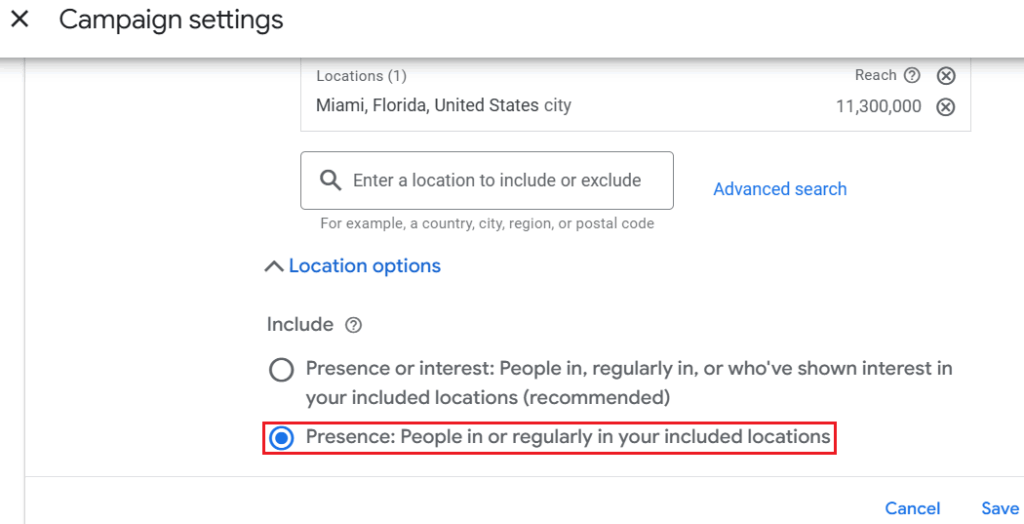
- Geotargeting Precision: It’s not enough to simply select your city. One of the most common mistakes we see is relying on Google’s default setting („Presence or Interest”), which shows your ads to people interested in your city, even if they live halfway across the country. For a local service business, this is wasted spend. You must ensure your settings are locked to people physically located in your service area.
- The „Negative” Audience: If you offer high-end HVAC installations, you likely want to avoid the „DIY” crowd. Someone searching for „how to fix AC unit cheap” is not your client. Identifying who you don’t want is just as important as finding who you do want.
Budgeting & ROI Estimation for Service Business PPC Campaigns
„How much should I spend?” is the most common question we get. The answer isn’t a guess; it is a mathematical equation based on your market.
To estimate your budget, you need to work backward from the Cost Per Click (CPC) in your specific industry:
- Average CPC: If a click for „emergency dentist” costs $15.
- Conversion Rate: And your website converts 10% of visitors into callers.
- Cost Per Lead: It will cost you roughly $150 to generate one lead.
The Budget Trap: Many businesses set a „safe” budget of $10 or $20 a day. However, if the Cost Per Lead is $150, a small budget means your ads might only generate one lead every two weeks. This is too slow to gather data or momentum.
To make Google Ads work, your budget needs to be sufficient to capture enough data to optimize the campaign. Under-funding a campaign is often riskier than over-funding it, as you pay for clicks but never reach the threshold needed to see results.
Keyword Research Strategies – Google Ads for Service Businesses

If your targeting settings are the „where” of your campaign, your keywords are the „who.”
In the world of Google Ads for service businesses, keyword research is not just about making a list of what you do. It is about understanding the psychology of the person searching. A common mistake we see in self-managed accounts is targeting every possible term related to the industry in one big bucket. This is the fastest way to burn a budget.
Effective keyword research requires a sniper approach, not a shotgun approach. You need to identify the specific terms that signal a willingness to pay, rather than just a desire to learn.
Emergency Intent vs. Research Intent in Service Company Search Terms
Not all searches are created equal. The most successful accounts categorize keywords based on the urgency of the user and the value of the service.
- Emergency Intent („I need help now”):
- Examples: „Emergency dentist near me,” „Broken tooth pain,” „24/7 repair.”
- Strategy: These users are panic shopping. They have a problem and need an immediate solution. For these terms, you must bid aggressively to be in position #1, because they will likely call the first number they see.
- High-Ticket/Research Intent („I am planning a project”):
- Examples: „Dental implants,” „Full mouth reconstruction,” „Veneers consultation.”
- Strategy: These users are in the consideration phase. They might not book today. The goal here is to sell the consultation, not the procedure.
Finding High-Intent Keywords for Service Business Lead Generation
To generate leads that actually convert into revenue, you must focus on „commercial intent” keywords. These are search terms that include modifiers indicating the user is ready to hire a professional.
For a premium service business, broad terms are dangerous.
- Bad Keyword: „Teeth” or „Dentist.” (Too vague, could be a student, a DIYer, or someone looking for a job).
- Good Keyword: „Cosmetic dentist miami” or „Implant specialist near me.”
We focus on finding „Long-Tail Keywords”—phrases that are 3-4 words long. While they have lower search volume, they have a much higher conversion rate. A user searching for „Porcelain veneers cost for front teeth” is far further down the sales funnel than someone searching for „white teeth.”
Building a Negative Keyword List to Optimize Service Ads Spend
This is the single most overlooked aspect of Google Ads for service businesses, and it is where agencies earn their keep.
A Negative Keyword tells Google exactly when not to show your ad. Without a robust negative list, you will pay for clicks from people who will never become clients.
- The „Freebie” Seekers: You should likely block words like free, cheap, DIY, how to, home remedy, university, student.
- The Job Hunters: You don’t want to pay for clicks from people looking for employment. You must negate terms like job, salary, training, school, course, hiring.
- The Competitor Noise: If you are a high-end clinic, you might want to negate the names of budget-friendly chains or government-subsidized options to ensure you aren’t attracting price-sensitive leads.
Organizing Keywords by Local Service Business Categories
Finally, structure matters. A rookie mistake is dumping all services into one campaign.
For maximum control, distinct services require distinct Campaigns, not just ad groups. This allows you to set specific budgets for each service type (e.g., ensuring your high-margin Implant budget isn’t wasted on low-margin fillings).
Crucially, each campaign must lead to a Dedicated Landing Page that matches the user’s intent perfectly. Sending all traffic to your homepage is a conversion killer.
Best Practice Structure:
- Campaign A: Emergency Dentistry
- Keywords: „Emergency dentist,” „severe tooth pain.”
- Destination: Emergency Landing Page. Features a large „Call Now” button, minimal text, and „Open 24/7” messaging. Focus is on speed.
- Campaign B: Cosmetic & Veneers
- Keywords: „Veneers cost,” „smile makeover.”
- Destination: Cosmetic Landing Page. Features before/after photos, patient testimonials, and financing options. Focus is on aesthetics and trust.
- Campaign C: Dental Implants
- Keywords: „Dental implants,” „missing tooth replacement.”
- Destination: Implant Landing Page. Features doctor credentials, technology used, and a „Free Consultation” form. Focus is on expertise and authority.
By separating these at the Campaign level, you ensure that the message, the budget, and the landing page experience are perfectly aligned with what the user is looking for.
Setting Up Your Google Ads Account for Service Business Success
The setup phase is where the battle is won or lost.
A common misconception is that Google wants you to succeed. In reality, Google is a business, and their default settings are designed to maximize their revenue, not yours. If you simply follow the „Recommended” setup wizard, you will likely end up with broad targeting, wasted placements, and a blown budget.
To succeed, you must switch from „Smart Mode” (the simplified version) to „Expert Mode.” This gives you the control necessary to protect your budget.
Google Ads Setup for Service Providers
We won’t bore you with every single button click, but here are the critical „fork in the road” decisions where you must choose wisely:
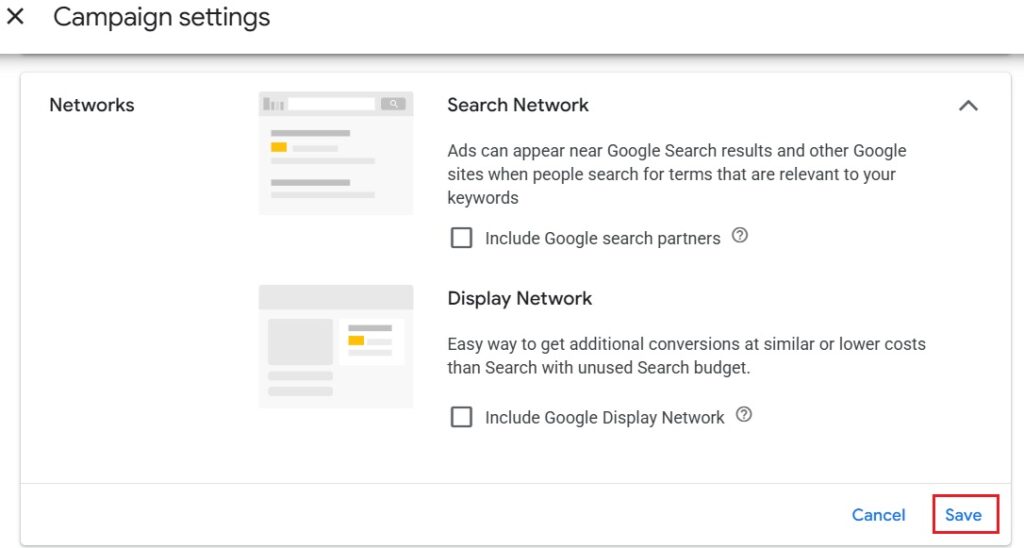
- Network Settings (The „Display” Trap): By default, Google will opt you into the „Display Network” (banners on other websites) alongside your Search ads.
The Fix: Turn this off immediately. For a service business, you want people actively searching for you, not people reading a blog who accidentally click a banner. Mixing these two dilutes your data and wastes money.
2. Location Options (Advanced): As mentioned earlier, selecting your city isn’t enough. You must open the „Location Options” drop-down.
The Fix: Change the target from „Presence or Interest” to „Presence: People in or regularly in your targeted locations.” This prevents someone in another country from clicking your ad just because they were reading news about your city.
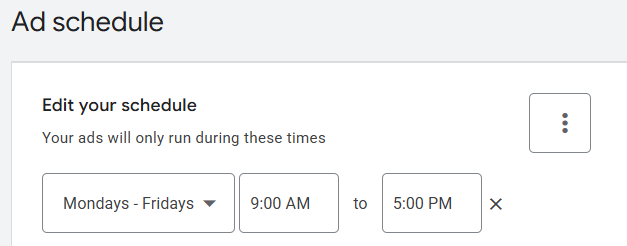
3. Ad Schedule (Dayparting): Do you have a receptionist answering phones 24/7?
- The Fix: If your primary goal is phone calls, set your ads to run only during business hours. There is no point paying $50 for a click at 3:00 AM if the call goes to voicemail and the lead hangs up. (Exception: Emergency services or campaigns driving traffic to a booking form).
The Best Campaign Structure for Service-Based Businesses
Structure dictates budget control. The biggest structural mistake we see is „The Kitchen Sink” approach—dumping every service into one campaign.
If you are a dental practice, you likely have high-margin services (Implants, Veneers) and low-margin services (Check-ups, Cleanings). If you group them together, Google’s algorithm will naturally spend your budget on the cheaper, high-volume clicks (Cleanings), starving your high-value ads.
The „Single Service” Campaign Model: For premium businesses, we recommend creating separate Campaigns for each distinct service category.
- Campaign 1: High-Value/Cosmetic (Budget: $100/day)
- Targeting: „Veneers,” „Smile Makeover.”
- Goal: High ROI, specific aesthetic clients.
- Campaign 2: Emergency/Urgent (Budget: $50/day)
- Targeting: „Root canal,” „Emergency extraction.”
- Goal: Volume and speed.
- Campaign 3: General/Brand (Budget: $20/day)
- Targeting: „Dentist near me,” [Your Practice Name].
- Goal: Defensive visibility.
This structure allows you to act as a portfolio manager. If „Cosmetic” is bringing in great ROI, you can increase that specific budget without accidentally spending more on „General” clicks.
Smart Bidding Strategies for Profitable Service Business PPC
Bidding is how you tell Google how much you are willing to pay for a result. Google’s AI is powerful, but it needs guidance.
- Manual CPC (The „Control” Phase): When launching a new account, we often start with Manual CPC. This allows us to set a hard cap on what we pay for a click. It is the safest way to gather initial data without Google overspending.
- Maximize Conversions (The „Scale” Phase): Once the account is generating consistent leads (15-30 per month), we may switch to „Maximize Conversions.” This tells Google: „I don’t care about the cost per click; just get me as many leads as possible within my daily budget.”
- Target CPA (The „Profit” Phase): This is the gold standard. Once we know your average Cost Per Lead is sustainable at $50, we set a Target CPA (Cost Per Acquisition) of $50. Google will then use its vast data to bid higher for users likely to convert and bid lower (or not at all) for users who are just browsing.
Warning: Do not start a brand new campaign on „Target CPA” or „Maximize Conversions.” Without historical data, Google is guessing, and those guesses can be expensive.
Writing High-Converting Google Ads Copy for Service Business
Your ad is your first handshake with a potential client. In a fraction of a second, you must convince them that you are professional, local, and capable of solving their problem.
In the service industry, „clever” copy rarely works. Clients aren’t looking for puns; they are looking for reassurance. The most effective ads are clear, direct, and benefit-focused.
Creating Ad Headlines That Attract Local Service Clients
You have 3 headlines (30 characters each) to win the click. If you waste this space on your company name or generic fluff, you will lose to the competitor who uses it wisely.
For service businesses, effective headlines usually follow a „Problem – Solution – Trust” formula:
- Headline 1: Mirror the Search (The Hook)
- If they search for „Dental Implants,” your headline must say „Dental Implants” or „Permanent Tooth Replacement.” This signals immediate relevance.
- If they search for „Dental Implants,” your headline must say „Dental Implants” or „Permanent Tooth Replacement.” This signals immediate relevance.
- Headline 2: The Local/Benefit Qualifier (The Promise)
- „Same-Day Appointments,” „Top-Rated NYC Clinic,” or „0% Financing Available.” This tells them why they should choose you.
- „Same-Day Appointments,” „Top-Rated NYC Clinic,” or „0% Financing Available.” This tells them why they should choose you.
- Headline 3: The Call to Action or Trust Signal (The Closer)
- „Book Your Free Consultation,” „15+ Years Experience,” or „5-Star Rated Service.”
- „Book Your Free Consultation,” „15+ Years Experience,” or „5-Star Rated Service.”
Pro Tip: Use Dynamic Keyword Insertion (DKI) carefully. This feature automatically inserts the user’s search term into your headline. While it increases relevance, it can look robotic if not managed well. For premium services, handwritten copy often outperforms automation because it feels more human.
Utilizing Ad Extensions to Enhance Service Business Listings
Ad Extensions (now called „Assets”) are free tools that make your ad physically larger on the screen. A bigger ad pushes competitors further down the page and increases your Click-Through Rate (CTR).
For a service business, these four extensions are non-negotiable:
- Location Extensions: Connect your Google Business Profile. This shows your address and distance from the user, proving you are truly local.
- Call Extensions: Adds a clickable phone number directly to the ad. On mobile, this allows users to call you without even visiting your website—perfect for emergency intent.
- Sitelink Extensions: These are additional links below your main ad. Use them to deep-link to specific high-value pages like „Pricing,” „Patient Testimonials,” or „Meet the Doctor.”
- Callout Extensions: Short, non-clickable snippets of text to highlight perks. Use this for trust signals: „Licensed & Insured,” „Family Owned,” „Open Saturdays.”
A/B Testing Your Service Company Ads for Better Results
You should never write just one ad. You don’t know what will resonate with your market until you test it.
We recommend running at least two variations (A and B) per ad group to compete against each other:
- Ad A (The Logic Ad): Focuses on price, speed, and features.
- Headline: „Affordable Dental Implants | Financing Available.”
- Headline: „Affordable Dental Implants | Financing Available.”
- Ad B (The Emotion Ad): Focuses on the outcome and confidence.
- Headline: „Restore Your Perfect Smile | Feel Confident Again.”
- Headline: „Restore Your Perfect Smile | Feel Confident Again.”
The Testing Cycle: Let both ads run for 30 days. Google will naturally start showing the winner more often. Once you have a clear winner (higher CTR and conversion rate), pause the loser and write a new „Challenger” ad to try and beat the current champion. This process of „Continuous Optimization” is how we lower your cost per lead over time.
Optimizing Landing Pages for Google Ads for Service Business Traffic
You can have the perfect keyword strategy and the most compelling ad copy, but if your website fails to convert the visitor, your budget is wasted.
Think of Google Ads as the invitation to the party, and your landing page as the party itself. If the invitation is great but the venue is messy and confusing, people will leave immediately. In digital marketing terms, this is a „bounce,” and it costs you money every single time.
Why Service Businesses Need Dedicated PPC Landing Pages
One of the costliest mistakes business owners make is sending paid traffic to their Homepage.
Homepages are designed for exploration. They have menus, „About Us” stories, blog links, and social media icons. They are full of distractions. Landing Pages are designed for one single purpose: Conversion.
When a user clicks an ad for „Dental Implants,” they should arrive on a page that talks only about implants. It should not mention teeth whitening, root canals, or the history of your clinic. By removing the navigation menu and focusing the content entirely on the user’s specific search, we typically see conversion rates double or triple compared to sending traffic to a homepage.
Speed to Lead: The Secret to High ROI on Service Ads
For service businesses, the battle is often won or lost in the first 5 minutes.
If a potential client fills out a form on your landing page, the clock starts ticking. Data shows that the odds of qualifying a lead drop by 80% if you wait just 5 minutes to respond. If you wait an hour, that lead has likely already spoken to a competitor.
The Pro Strategy: We don’t just optimize for the click; we optimize for the connection.
- Immediate Notification: Ensure your forms are connected to your CRM or email so your front desk is notified instantly.
- „Click-to-Call” Priority: On mobile devices, prioritize phone calls over contact forms. A live conversation is always worth more than a form fill.
- Auto-Responders: If you cannot answer immediately, use an automated SMS or email confirming the inquiry and stating exactly when you will call back.
Building Trust & Social Proof on Service Business Landing Pages
When a stranger lands on your page, their guard is up. They are asking: „Is this company legitimate? Can I trust them?”
Your landing page must answer these questions visually and immediately—what we call „Above the Fold” (the part of the screen visible without scrolling).
- The „Hero” Shot: Use real photos of your team, your clinic, or your branded trucks. Avoid stock photos of smiling models; they look fake and reduce trust.
- Social Proof: display your Google Star rating prominently. Embed a carousel of recent 5-star reviews.
- Authority Badges: Showcase your accreditations, awards, or „As Seen On” logos. These visual shortcuts tell the brain that you are an established authority, not a fly-by-night operation.
Conversion Tracking: Measuring Calls & Forms for Service Campaigns
If you aren’t tracking, you aren’t marketing—you’re gambling.
You must know exactly which keyword and which ad generated the lead. It is not enough to know „I got a call.” You need to know „I got a call from the 'Implants’ campaign via the 'Restore Your Smile’ ad.”
- Form Tracking: This is standard. When a user submits a form, they should be redirected to a „Thank You” page, which triggers a conversion event in Google Ads.
- Call Tracking (Crucial): For service businesses, phone calls are often 70-80% of leads. We use dynamic call tracking software (like CallRail) that swaps the phone number on your website based on where the visitor came from. This allows us to record the call, attribute it to the specific keyword, and even listen to the recording to score the quality of the lead.
This data loop allows us to kill the keywords that generate „junk” calls and double down on the keywords that generate revenue.
Local Targeting & Optimization for Google Ads for Service Business
The beauty of Google Ads is its precision. You are not buying a billboard on a highway hoping the right person drives by; you are buying access to a specific screen, in a specific hand, in a specific zip code.
However, precision requires maintenance. A campaign that starts strong can degrade over time if the targeting isn’t tightened and the data isn’t scrubbed. This is the difference between a campaign that „used to work” and one that consistently scales.
Geotargeting Best Practices for Local Service Ads
For a local service business, a lead outside your service area is worse than useless—it’s an expense and a distraction.
While selecting your city is the first step, sophisticated campaigns go much deeper using Layered Location Targeting:
- Radius vs. Zip Codes: A simple 10-mile radius is often too blunt. It might include neighborhoods you don’t want to service or areas across a bridge that your team hates driving to. We prefer targeting by specific Zip/Postal Codes. This allows us to „gerrymander” your service map, ensuring you only pay for visibility in the areas that make logistical sense for your team.
- Income Tier Targeting: For premium service businesses (like cosmetic dentistry or luxury remodeling), you can layer Household Income data on top of your location.
- The Strategy: We can bid aggressively (e.g., +20%) on users in the top 10% income bracket to ensure you win the most valuable eyes, while excluding the bottom 50% to avoid price-shoppers who cannot afford your high-ticket services.
- The Strategy: We can bid aggressively (e.g., +20%) on users in the top 10% income bracket to ensure you win the most valuable eyes, while excluding the bottom 50% to avoid price-shoppers who cannot afford your high-ticket services.
- Location Exclusions: Equally important is telling Google where not to show up. If you service the North Side but not the South Side, you must explicitly exclude the South Side to prevent „radius bleed.”
Preventing Competitor Click Fraud in Service Business PPC
It is the dark side of local advertising: Click Fraud.
In highly competitive service sectors, it is not uncommon for a rival business to click on your ads repeatedly to drain your daily budget, ensuring their ad shows up instead. Bots and scrapers can also skew your data.
Google has some built-in defenses, but for high-cost-per-click industries, they are often insufficient.
- The Defense: We utilize third-party click fraud protection software (like ClickCease) that monitors every single interaction.
- How It Works: If the software detects suspicious behavior—like a user clicking your ad 3 times in 1 minute, or a click coming from a known VPN or bot farm—it automatically blocks that IP address from seeing your ads ever again.
- The Result: This ensures that your budget is spent on real potential clients, not your competitors’ jealousy.
Routine Optimization Checklists for Service Company Google Ads
The „Set it and Forget it” mentality is why most campaigns fail. Google’s landscape changes daily—new competitors enter the market, bids fluctuate, and search trends shift.
To maintain a high ROI, a service business campaign requires a rigorous maintenance schedule. Here is a glimpse of what our weekly optimization checklist looks like:
- Search Term Auditing: We review the actual terms people typed in to trigger your ads. If we see „cheap” or „DIY” slipping through, we add them to the Negative Keyword list immediately.
- Bid Adjustments: We analyze performance by device and time.
- Scenario: If we notice mobile phones convert 2x better than desktops, we increase bids on mobile.
- Scenario: If Tuesday afternoons never generate leads, we pull back the budget for that time slot.
- Quality Score Triage: We monitor your keywords’ Quality Score (1-10). If a score drops, it means your costs are rising. We investigate immediately—is the ad copy stale? Is the landing page loading too slow?—and fix the root cause.
Optimization is not about making big changes every day; it is about making small, calculated adjustments that compound into massive savings and higher conversion rates over time.
Scaling Your Google Ads for Service Business Revenue

Once your foundational Search campaigns are profitable—meaning you are putting $1 in and getting $3, $5, or $10 back—the conversation shifts from „survival” to „scale.”
Scaling isn’t just about increasing your daily budget. If you simply double your spend without a strategy, you will often see your Cost Per Lead (CPL) skyrocket. Scaling requires unlocking new inventory and capturing clients at different stages of the buying cycle.
When to Launch Remarketing for Service-Based Companies
The reality of premium services—whether it’s a $50,000 home renovation or a $20,000 dental reconstruction—is that people rarely buy on the first click. They research, they compare, and then they get distracted.
Remarketing allows you to follow these visitors around the web, showing them your ads on news sites, YouTube, or social media to bring them back to your site.
- The „Fence-Sitter” Strategy: We set up audiences for users who visited your „Pricing” or „Contact” page but didn’t submit a form. These are your hottest leads. We show them ads featuring testimonials or a „Limited Time Offer” to nudge them over the finish line.
- The Healthcare Warning: If you run a medical or dental practice, you must be careful. Google has strict privacy policies preventing „Personalized Advertising” based on health conditions. You cannot retarget someone specifically because they looked at „root canals.” For these clients, we use broader branding strategies or „Customer Match” lists to stay compliant while remaining visible.
Using Performance Max for Service Business Scalability
Performance Max (PMax) is Google’s newest, AI-driven campaign type. It doesn’t just show text ads; it automatically creates ads for YouTube, Google Maps, Gmail, and Display banners all at once.
- The Power: PMax is excellent for finding clients you wouldn’t have thought to target. It uses machine learning to find „lookalike” audiences based on your existing customers.
- The Risk: PMax is a hungry beast. It requires a lot of data to work correctly.
- When to Use It: We typically only introduce Performance Max after your standard Search campaigns have generated at least 30-50 conversions. We feed that data into the AI so it knows exactly what a „good lead” looks like. If you launch PMax too early without data, it will waste money guessing.
Common Google Ads Mistakes Service Businesses Make (And How to Fix Them)
Even seasoned business owners fall into specific traps when trying to manage ads themselves. Here are the three most common revenue-killers we see during audits:
- The „Smart Campaign” Trap:
- The Mistake: Using Google’s simplified „Smart Mode” (formerly Google Express). It’s easy to set up, but it offers almost zero data transparency. You have no control over negative keywords or bidding.
- The Fix: Always build in „Expert Mode.” Yes, it’s more complex, but it gives you the controls necessary to stop wasted spend.
- Obsessing Over CPL vs. ROAS:
- The Mistake: cutting a keyword because the Cost Per Lead (CPL) is high ($100), without realizing those leads are for your highest-margin service.
- The Fix: Focus on ROAS (Return on Ad Spend). A $100 lead for a $50 job is a disaster. A $100 lead for a $5,000 job is a home run. Track the value, not just the cost.
- Ignoring the „Call-Only” Opportunity:
- The Mistake: Forcing mobile users to visit a complex website to find a phone number.
- The Fix: For emergency services (plumbing, urgent dental), use „Call Ads.” These ads don’t link to a website; when clicked, they simply open the dialer on the user’s phone. This removes friction and drastically increases conversion rates for urgent needs.
Conclusion: Mastering Google Ads for Your Service Business
Google Ads is not just a marketing channel; for service businesses, it is a predictable revenue engine. When tuned correctly, it gives you the power to turn lead flow on and off like a faucet, freeing you from the unpredictability of word-of-mouth.
However, as we have explored in this guide, „profitability” is in the details.
The difference between a campaign that wastes money and one that scales your business lies in the nuances:
- Distinguishing „Emergency Intent” from „Research Intent.”
- Building robust Negative Keyword lists to filter out the noise.
- Ensuring your Landing Pages convert the traffic you pay for.
- Tracking Revenue, not just clicks.
You now have the blueprint to build a sophisticated campaign. The question is: Do you have the time to execute it?
As a business owner, your time is your most expensive asset. You can spend hours every week monitoring search terms, adjusting bids, and fighting click fraud—or you can hand the keys to a team that does this every single day.
If you are ready to stop guessing and start generating consistent, high-value leads, the next step is simple. Just send me an email and schedule a free consultation.
FAQ: Google Ads For Service Business
Is Google Ads worth it for small service businesses?
Absolutely. In fact, it is often more critical for small businesses than large ones. You don’t need a Super Bowl budget to compete; you just need a local budget. Google Ads levels the playing field, allowing a small independent clinic or contractor to appear directly above a large national chain in search results. If you can answer the phone and service the client, you can win the business.
How much should a service business spend on Google Ads?
This depends on your average „Cost Per Click” (CPC), but we generally recommend a starting budget of at least $1,500 to $3,000 per month for premium service sectors (like dentistry or remodeling). The logic: You need enough budget to generate at least 10-15 clicks per day. If your budget is too low (e.g., $10/day), your ads will stop running by 10:00 AM, and you won’t generate enough data to optimize the campaign.
How long does it take to see results from Google Ads?
Traffic is instant; profitability takes time. You will start getting calls the moment your ads go live. However, the first month is typically the „Learning Phase” where we gather data on which keywords convert best. We usually see campaigns hit their „sweet spot” of maximum ROI (Return on Ad Spend) by Month 3, after we have optimized negative keywords and bidding strategies.
Google Ads vs. SEO: Which is better for local services?
They serve different purposes.
- SEO (Search Engine Optimization) is a long-term asset. It’s free traffic, but it can take 6-12 months to rank on page 1.
- Google Ads is a tap. You turn it on, and you are on page 1 immediately.
- The Verdict: For immediate lead generation and cash flow, start with Google Ads. Use the profits from those ads to fund your long-term SEO strategy.
Can I run Google Ads myself, or do I need an agency?
You can run them yourself, just like you can fix your own plumbing or do your own taxes. The question is: should you? Google’s default settings are designed to spend your money easily. If you don’t have time to monitor search terms, adjust bids, and install conversion tracking pixels, the „DIY tax” (wasted spend) often costs more than an agency management fee.
Why are clicks in my industry (e.g., Dentistry/HVAC) so expensive?
High click costs indicate high competition, but also high reward. If a click costs $50, it’s usually because the market knows that one new patient/client is worth $3,000+. The goal isn’t to find „cheap” clicks; it’s to improve your Quality Score (ad relevance) and Conversion Rate so that you can afford those expensive clicks while your competitors cannot.
Why am I getting clicks but no phone calls?
This is almost always a Landing Page issue, not an Ad issue. If people are clicking, your ad is working. If they aren’t calling, your website is failing to build trust. Common culprits include: sending traffic to the homepage, slow loading speeds, burying the phone number, or lacking social proof (reviews/photos).
Will my competitors drain my budget by clicking my ads?
It is a valid concern. „Click Fraud” does happen. However, sophisticated campaigns use Click Fraud Protection software. This blocks IP addresses that demonstrate suspicious behavior (like clicking your ad 3 times in 10 seconds), ensuring your budget is spent on real customers, not jealous rivals.
What is a "good" conversion rate for a service business?
While e-commerce stores might be happy with 2%, local service businesses should aim higher. For „Emergency” intent (e.g., „urgent plumber”), conversion rates can reach 20-30%. For high-ticket research intent (e.g., „dental implants”), a conversion rate of 5-10% is considered healthy.
Do I have to sign a long-term contract with Google?
No. Google Ads is entirely month-to-month. You can pause, stop, or scale up your campaigns at any time instantly. This flexibility is perfect for seasonal businesses (like HVAC) that need to push hard in summer/winter and pull back in spring/fall.

Daniel Ostrzyzek
Hi, I’m Daniel Ostrzyzek, a passionate Google Ads specialist with over 8 years of experience. I work with small to medium-sized businesses to help them attract leads, achieve their growth goals, and maximize ROI through Google Ads campaigns. After discovering my passion for digital marketing, I dove deep into Google Ads. Over the years, I’ve gained valuable experience working with businesses across various industries. I specialize in Google Ads Search and lead generation campaigns, helping my clients maximize the results of their online advertising.
Let's Talk!
I’m here to help you grow your business with the power of Google Ads. If you’re ready to take your campaigns to the next level – Schedule My Free Consultation