
Does google ads work for small business?
Search online, and you’ll find conflicting advice on whether pay-per-click is a money pit or a rapid growth engine.
Does google ads work for small business? The short answer – Yes, Google Ads is highly effective for small businesses. In fact, the platform was originally created specifically to help small businesses succeed.
However, winning on a limited budget means you cannot put your account on autopilot. To beat out larger competitors and maximize your ROI, your strategy must focus on:
- Laser Targeting: Strictly targeting high-intent searchers with the right strategy.
- Detailed Optimization: Finding a strong Unique Selling Proposition (USP) to stand out from the competition.
- Avoiding Default Settings: Rejecting Google’s automated recommendations on new accounts—like „Smart Campaigns”—which is an incredibly fast way to burn your budget immediately.
Contents
- 1. Does google ads work for small business
- 1.1. Does google ads work for small business?
- 1.2. Benefits of Google Ads for Small Business
- 1.3. Does Google Ads Work for Small Business - Costs & Budgeting
- 1.3.1. The actual cost of running ads varies significantly based on your niche, but it helps to have a baseline. Recent benchmark data from WordStream shows that the average cost per click (CPC) across all industries is $5.26.
- 1.3.2. Recommended Budget Ranges for Small Businesses in Google Ads
- 1.3.3. Setting a Budget: Factors to Consider
- 1.4. Google Ads For Small Business - Choosing the Right Campaign Type
- 1.5. Let's Talk!
- 1.6. Comparing Google Ads For Small Business to Other Marketing Channels
- 1.7. Does google ads work for small business - Common Mistakes & How to Avoid Them
- 1.8. Does google ads work for small business - Case Study
- 1.9. The Verdict: Does Google Ads Work For Small Business?
- 1.10. FAQ: Does google ads work for small business
- 1.10.1. 1. Does Google Ads work for small business?
- 1.10.2. 2. Is Google Ads worth it for small businesses?
- 1.10.3. 3. How much should a small business spend on Google Ads?
- 1.10.4. 4. Can a small budget compete with larger advertisers?
- 1.10.5. 5. What Google Ads campaign types are best for small businesses?
- 1.10.6. 6. Should I use Smart Campaigns or Performance Max right away?
- 1.10.7. 7. Do Google Ads improve SEO rankings?
- 1.10.8. 8. How quickly can a small business see results?
- 1.10.9. 9. How do I track conversions and ROI for my small business?
- 1.10.10. 10. Should I hire an agency or manage Google Ads myself?
- 1.10.11. Daniel Ostrzyzek
- 1.11. Let's Talk!
Benefits of Google Ads for Small Business
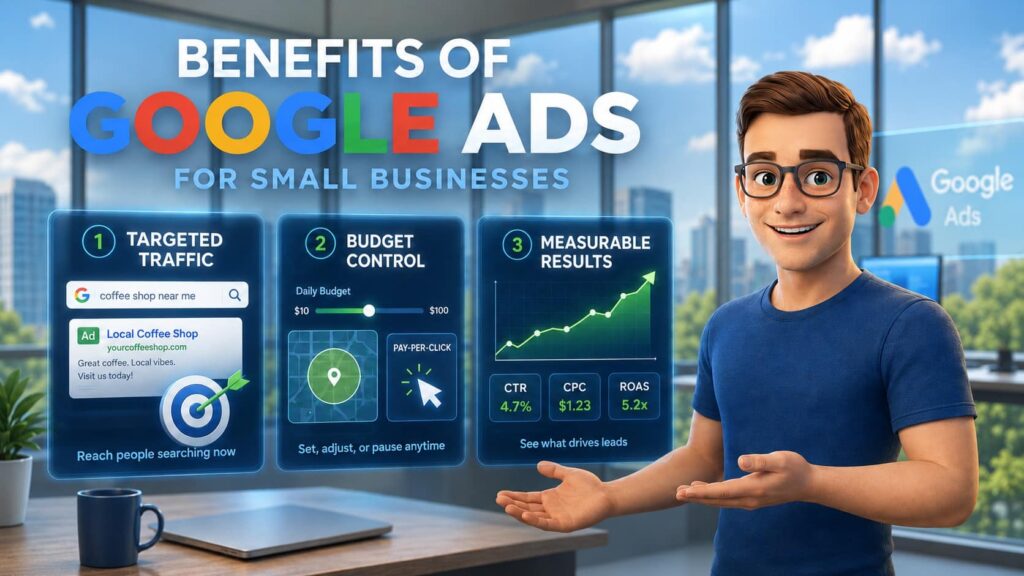
Targeted and Immediate Traffic
Unlike traditional advertising, Google Ads for small business allows you to reach people exactly when they are actively searching for specific services. This intent-based traffic is vastly different from social media advertising. While social media ads interrupt users who are casually scrolling for entertainment, Google Search ads capture high-intent users who already have a problem and are actively looking to spend money on a solution.
Full Budget Control and Flexible Targeting
You are never locked into a massive, upfront advertising contract. Google Ads offers full budget control by letting you set strict daily budgets that you can adjust or pause at any time. You can also leverage flexible targeting options, such as geotargeting to ensure your ads only show to local customers, or audience segmentation to dial in on your ideal buyer. Best of all, because it is a pay-per-click (PPC) model, you only pay when a user actually clicks on your ad.
Measurable Results and Quick Feedback
Traditional marketing is notoriously difficult to track, but Google Ads provides crystal-clear, measurable results instantly. You can easily track every critical performance metric, including Click-Through Rate (CTR), Cost Per Click (CPC), conversion rate, Cost Per Acquisition (CPA), and Return on Ad Spend (ROAS). This quick feedback loop lets you know exactly which keywords are driving revenue. When managed strategically, the platform is highly lucrative; according to Google’s economic impact methodology, businesses earn an average of $8 in profit for every $1 spent on Google Ads and search.
Does Google Ads Work for Small Business - Costs & Budgeting
The actual cost of running ads varies significantly based on your niche, but it helps to have a baseline. Recent benchmark data from WordStream shows that the average cost per click (CPC) across all industries is $5.26.
To get an accurate estimate for your own campaigns, we need to know what the average CPC is in your specific industry, which we can easily check using the Google Ads Keyword Planner.
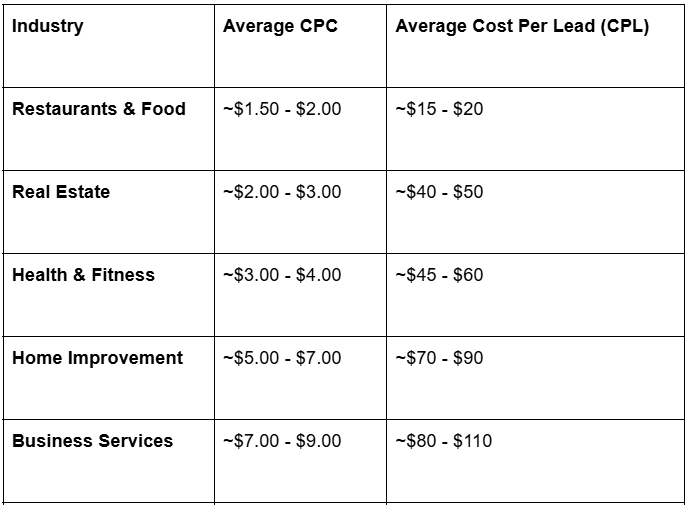
To give you an idea of how these costs fluctuate, here is a look at average CPC and cost per lead across several common sectors, such as restaurants and food, real estate, health and fitness, business services, home improvement:
(Note: These are estimated benchmarks; your actual costs will depend on your local market and campaign optimization).
Recommended Budget Ranges for Small Businesses in Google Ads
A widely recommended starting budget for small businesses evaluating Google Ads is between $1,000 and $2,500 per month.
From my personal experience managing client accounts, a lot of businesses starting with budgets around $2,500 are working well, but to be honest, we’re pretty fast at scaling this budget up to $10,000 because they see the revenue.
While budgets will naturally vary depending on your specific industry and local competition, you must ensure you have enough daily spend to let the algorithm learn. A golden rule of thumb is to set a daily budget large enough to generate at least 10 clicks per day for meaningful data.
Setting a Budget: Factors to Consider
Setting your budget isn’t just about picking a random number; you need to factor in your overall business goals, customer lifetime value, cost-per-lead, and local competition.
Before launching, we need to calculate your target cost per lead and your cost per client. This is where your conversion rate becomes critical. Your conversion rate is the percentage of people who click your ad and actually take action, such as calling your business or filling out a form. For example, if you pay $5 per click and your landing page converts at 10%, it takes 10 clicks to get one lead, making your Cost Per Lead (CPL) $50.
Understanding this math helps frame realistic budgets and illustrates the difference between what a $500 budget versus a $3,000 budget can actually achieve. If you are a local plumber with a high lifetime value per customer, a $3,000 monthly budget might comfortably generate dozens of highly profitable jobs. However, if you are in a highly competitive insurance niche with a CPC of $30, a $500 monthly budget will drain too quickly to generate consistent, reliable leads. You have to align your budget with the reality of your industry’s auction prices and your website’s ability to convert traffic into paying clients.
Google Ads For Small Business - Choosing the Right Campaign Type
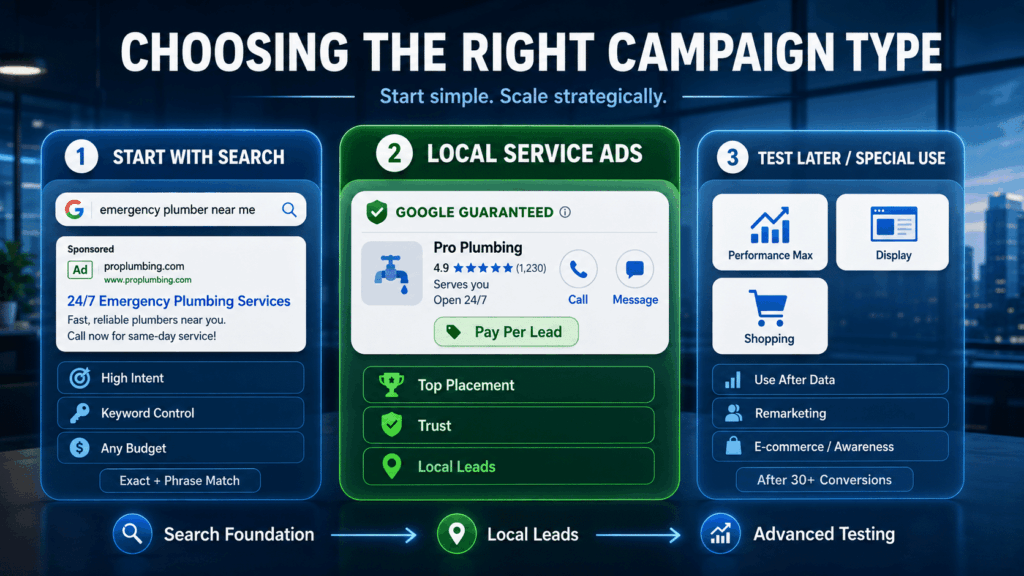
With Google Ads, choosing the right campaign type is the difference between building a high-converting lead machine and creating a black hole for your budget. Google offers several different ways to advertise, but not all of them are suited for a small business just starting out:

Let's Talk!
I’m here to help you grow your business with the power of Google Ads. If you’re ready to take your campaigns to the next level – Schedule My Free Consultation
Search Campaigns: The Essential Starting Point
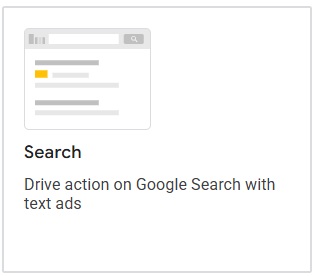
For most small businesses, standard Search campaigns are the mandatory foundation of your account. These are the traditional text ads that appear at the very top of Google when a user types in a specific query. Search ads capture high-intent users because you are getting in front of people who already know what they want and are actively searching for a solution to their problem.
These campaigns suit absolutely any budget because they offer you ultimate control. By utilizing exact match types and a robust list of negative keywords, you can ensure your limited funds are only spent on the exact search terms that are most likely to convert into paying clients.
Local Services Ads & Local Campaigns
If you operate a local, service-based business, Local Services Ads (LSAs) are an incredibly powerful tool. These ads appear at the absolute top of the search results—even above standard Search ads—and provide massive benefits for the home services, medical industries and much more.
Unlike Search campaigns, LSAs operate on a pay-per-lead model, meaning you only pay when a customer actually calls or messages you directly through the ad. However, to run these campaigns, you must pass Google’s rigorous background check and license verification process. Once approved, earning that „Google Guaranteed” or „Google Screened” badge builds instant, undeniable trust with local searchers. Just remember that the more positive opinions you have, the better for your business.
Performance Max, AI MAX and Smart Campaigns
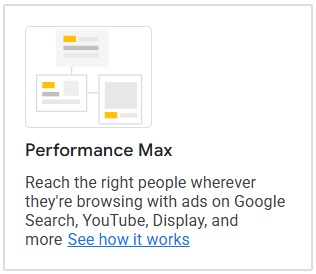
Google Ads for small business has heavily pushed automation recently, rolling out features like Performance Max (PMax), AI MAX for Search, and „Smart Campaigns” – do not use “Smart campaigns”. While PMax leverages machine learning to serve your ads across all of Google’s networks (Search, Display, YouTube, Maps, etc.), it acts as a „black box.” You have very little visibility or control over exactly where your budget is being spent.
My strict rule for service businesses: Do not start a brand-new account with these automated campaigns. New accounts will almost always receive a recommendation from Google to start with PMax or Smart Campaigns, but accepting this is a very fast way to burn your budget immediately.
You should only test these automated Google AI campaigns after your standard Search campaigns have successfully achieved your target CPA (Cost Per Acquisition). Wait until your Search campaigns are generating a lot of conversions—specifically, at least 30 conversions in the last 30 days. Once you have that rich baseline of converting data feeding the algorithm, you can safely allocate just 10% to 20% of your budget to test out AI MAX for Search or PMax.
Shopping, Display and Video Campaigns
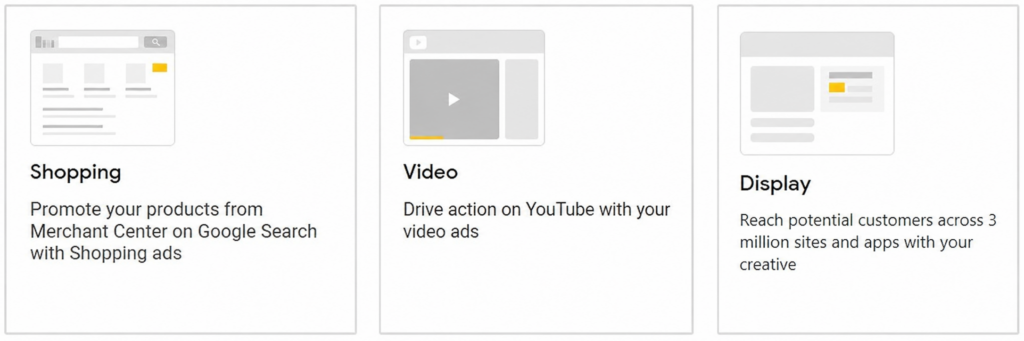
While Search is best for capturing immediate intent, other campaign types serve specific strategic purposes depending on your business model:
- Shopping Campaigns: If you run an e-commerce store, Shopping ads are essential. They display your product’s image, title, and price directly in the search results, capturing buyers with high commercial intent before they even click through to your website.
- Display Campaigns: These banner ads appear across millions of websites on the Google Display Network. While they aren’t the best for cold traffic, they are highly effective for remarketing. You can use them to follow past website visitors around the web, keeping your brand top-of-mind until they are ready to buy.
- Video Campaigns: Running ads on YouTube is excellent for broad brand awareness. They are highly cost-effective for getting thousands of local people on your business, but should generally be reserved for when you have a larger budget and have already maximized your direct lead-generation campaigns.
Comparing Google Ads For Small Business to Other Marketing Channels
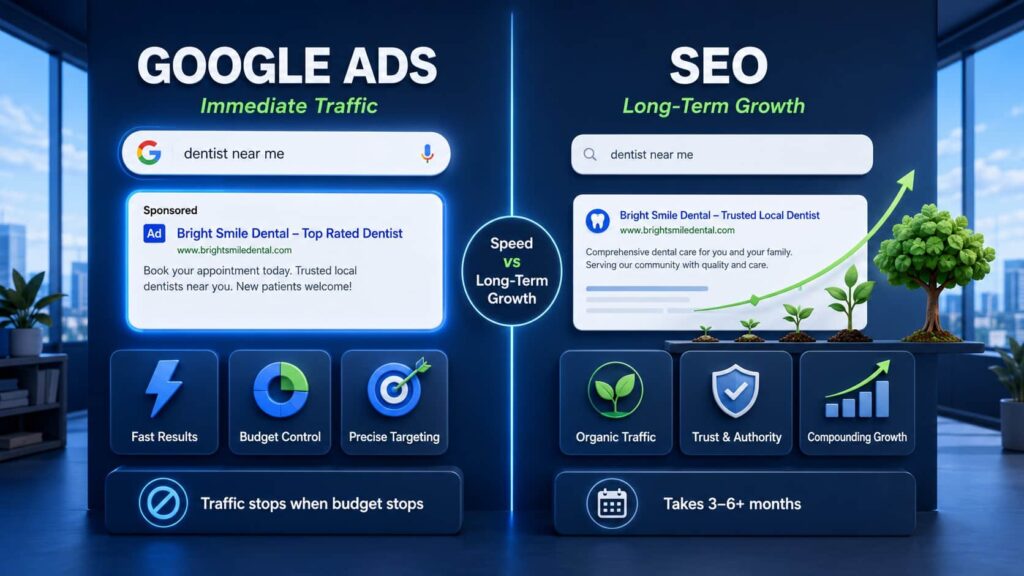
When deciding where to allocate a limited marketing budget, it is critical to understand how Google Ads stacks up against other channels. No single platform is a silver bullet; they each serve different strategic purposes.
Google Ads vs. SEO
The debate between Google Ads (PPC) and Search Engine Optimization (SEO) is common, but they are actually complementary strategies.
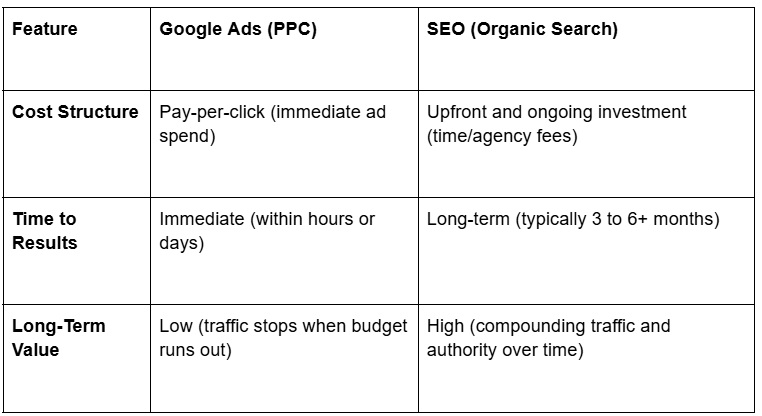
- Google Ads: Offers immediate traffic, total control over your daily budget, and precise targeting. You can launch a campaign today and have your phone ringing tomorrow. The downside is that the moment you pause your budget, the traffic stops completely.
- SEO: Builds incredible long-term brand trust and authority. While you don’t pay for organic clicks, SEO requires a significant upfront investment of time and resources to rank high. It can take 3 to 6 months (or more) to see a return.
When to prioritize: If you need revenue immediately to fund your operations, prioritize Google Ads. If you have the patience and budget to build a sustainable, long-term foundation, invest in SEO. The most successful small businesses eventually do both.
Google Ads vs. Social Media Ads
The biggest difference between Google Ads and social media advertising (like Facebook or Instagram) comes down to intent.
Google Ads relies on intent-based targeting. Users are actively typing a problem into the search bar (e.g., „emergency roof repair near me”), meaning they are highly qualified and ready to buy. Social media ads rely on interruption-based targeting. You are showing ads to users based on demographics or interests while they are casually browsing their feeds.
While social media clicks are often cheaper, the conversion rate is generally much lower because the users aren’t actively looking to make a purchase. For a local service business looking for high-quality leads, Google Ads almost always delivers a better return on investment.
Integrating PPC with Organic and Local Marketing
You do not have to choose your marketing channels in isolation. In fact, running Google Ads can significantly boost your overall brand presence when integrated tightly with your local SEO efforts.
When a customer searches for your service and sees your business at the very top as a paid ad, again in the local map pack, and a third time in the organic search results, it builds massive instant credibility.
Furthermore, you can link your Google Business Profile directly to your Google Ads account. This allows you to run location extensions, which can push your paid ads directly into the Google Map Pack. By integrating your PPC and local marketing, you dominate the most valuable real estate on the search results page, leaving less room for your competitors.
Does google ads work for small business - Common Mistakes & How to Avoid Them
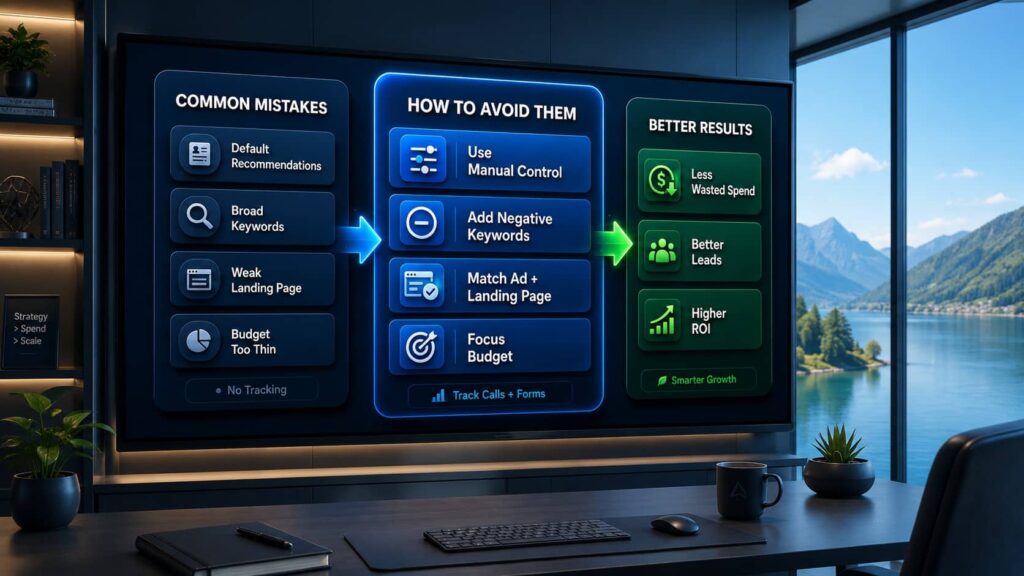
Relying on Google’s Default Recommendations
Google Ads for small business is designed to make it incredibly easy to start spending money, but relying on Google’s default settings will often waste your money. When you open a new account, you will likely receive strong recommendations from Google to start with their automated campaigns, or even worse, „Smart Campaigns”. Accepting these default recommendations is a pretty fast way to burn your budget immediately. By giving the algorithm full control before it has any conversion data, you end up paying for irrelevant traffic.
Using Broad Keywords Without Negative Keywords
Another frequent pitfall is using broad keywords without taking the time to build a negative keyword list. Specificity is incredibly important in paid search, and using negative keywords is essential to prevent irrelevant clicks. For example, if you bid on „plumber” without negative keywords, you might pay for clicks from people searching for „plumber salary” or „plumber jobs.” Negative keywords act as a shield, ensuring your budget is only spent on searchers with true commercial intent.
Neglecting Landing Pages and Tracking
Your ad is only the first step in the customer journey. Neglecting your landing pages and having poor alignment between what your ad promises and what the landing page delivers will cause visitors to bounce immediately. Just as damaging is a lack of conversion tracking. If you do not have tracking properly installed, you will have absolutely no idea which keywords are driving actual phone calls and sales, making it impossible to optimize your account or calculate your ROI.
Spreading Budget Too Thin
When starting out, there is often a temptation to advertise every service you offer across a wide region. However, spreading your budget too thin by launching too many campaigns on a small budget is a major mistake. If your daily budget is divided among too many keywords, none of them will get enough traction to perform well. Instead, you must emphasize focusing strictly on your highest-intent keywords and your most profitable geographic locations to get the best return on your investment.
Trying to Do It All Yourself
The Google Ads platform is constantly evolving. Now, with all of the new automations, AI rollouts, and rapid interface changes, there are simply too many changes for business owners to be aware of. You have a business to run, and you likely don’t have the time to keep up with every technical update. Because of this, the best way to succeed is to give a management fee to an experienced advertiser who knows how the platform works inside and out. Bringing in a professional—which is exactly what I do—ensures that the complexities are handled correctly, your goals are met, and your service business actually grows.
Does google ads work for small business - Case Study
One of the best ways to understand the power of detailed optimization is to look at real-world results. In a recent campaign for a local service provider (which you can read about in full on my website: 29% More Qualified Phone Calls in 30 Days Without Raising the Budget, we took over an underperforming Google Ads account.
By applying the exact principles discussed in this guide—pausing budget-draining default settings, restructuring their broad keywords, and implementing a rigorous negative keyword list—we were able to generate 29% more qualified phone calls in just 30 days. The best part? We achieved this massive boost in conversions without raising their monthly budget by a single cent. It proves that a standard $1,500 to $2,500 monthly budget doesn’t necessarily need to be increased to get better results; it just needs to be managed with laser precision to lower the cost per lead and maximize ROI.
The Verdict: Does Google Ads Work For Small Business?
Ultimately, yes—Google Ads for small business is an incredibly powerful growth engine for small businesses. When approached with a data-driven strategy, realistic budgets, and a focus on high-intent searchers, it can completely transform your lead generation and scale your revenue. However, treating the platform as a „set-it-and-forget-it” tool or relying blindly on Google’s default automations is a guaranteed way to waste your hard-earned budget. Success requires laser precision, constant optimization, and a deep understanding of how the auction system really works.
Stop Wasting Your Ad Spend—Let an Expert Handle It
The Google Ads platform is constantly evolving, with new AI features and interface updates rolling out regularly. As a business owner, there are simply too many changes for you to be aware of, and you likely do not have the time to keep up. Your focus needs to be on running your business and closing leads.
Now, with all of these new automations, it is crucial to have an experienced advertiser to help navigate the complexities. If you are tired of burning your budget on „Smart Campaigns” that do not convert, paying a management fee to an expert who knows how the platform works is the fastest way to turn things around and achieve your growth goals.
Ready to get more qualified phone calls without just blindly raising your budget?
Contact me today to see how we can restructure your account, protect your ad spend, and turn your Google Ads into a predictable, highly profitable lead machine.
FAQ: Does google ads work for small business
1. Does Google Ads work for small business?
Yes, it works incredibly well. In fact, Google Ads were originally made to help small businesses at first. By utilizing laser targeting, finding a strong Unique Selling Proposition (USP), and implementing detailed optimization, small businesses can easily beat the competition.
2. Is Google Ads worth it for small businesses?
Absolutely. Google Ads for small business is highly lucrative; according to Google’s economic impact methodology, businesses earn an average of $8 in profit for every $1 spent on the platform. It gives you immediate access to people who are actively searching for your specific services, meaning the traffic is highly targeted and ready to buy.
3. How much should a small business spend on Google Ads?
A widely recommended starting budget for small businesses is between $1,000 and $2,500 per month. From my experience, a lot of client accounts starting with a budget around $2,500 work very well. Once the campaigns are dialed in and the client sees the revenue, we are pretty fast at scaling this budget up to $10,000.
4. Can a small budget compete with larger advertisers?
Yes. The Google Ads auction does not just reward the highest bidder; it heavily factors in Quality Score and relevance. This means that if your ads and landing pages are highly relevant to the searcher, your small business can outsmart and outrank larger advertisers with bigger budgets.
5. What Google Ads campaign types are best for small businesses?
Standard Search campaigns are the essential starting point for service businesses because they capture high-intent users. For local, service-based companies (like home services or legal), Local Services Ads are also incredibly effective.
6. Should I use Smart Campaigns or Performance Max right away?
No. Most new accounts will get a recommendation from Google to start with automated „Smart Campaigns” or Performance Max (PMax), but this is a pretty fast way to burn your budget immediately. You should only try automated AI MAX or PMAX campaigns after your Search campaigns have achieved your target CPA and generated at least 30 conversions in the last 30 days. Once you hit that goal, you can allocate 10% to 20% of your budget to test them.
7. Do Google Ads improve SEO rankings?
No, running Google Ads does not directly improve your organic SEO rankings. However, Google Ads and SEO are complementary strategies. Running paid ads alongside a strong local SEO presence (like your Google Business Profile) boosts your overall brand presence and helps you dominate the search results.
8. How quickly can a small business see results?
Unlike SEO, which is a long-term strategy, Google Ads provides immediate traffic and quick feedback. You can theoretically launch a campaign today and start receiving qualified phone calls or form submissions tomorrow, provided your budget and targeting are set up correctly.
9. How do I track conversions and ROI for my small business?
To track your return on investment, you must set up conversion tracking using Google Ads and Analytics tags. This allows you to track specific goals and events so you can measure critical metrics like Cost Per Click (CPC), Cost Per Acquisition (CPA), conversion rate, and Return on Ad Spend (ROAS).
10. Should I hire an agency or manage Google Ads myself?
With the rapid rollout of new automations and constant changes, business owners rarely have the time to keep up with the platform. The best way to ensure success is to pay a management fee to an experienced advertiser who knows how the platform works. An expert will protect your budget from default recommendations and achieve the goals needed to grow your service business.

Daniel Ostrzyzek
Hi, I’m Daniel Ostrzyzek, a passionate Google Ads specialist with over 8 years of experience. I work with small to medium-sized businesses to help them attract leads, achieve their growth goals, and maximize ROI through Google Ads campaigns. After discovering my passion for digital marketing, I dove deep into Google Ads. Over the years, I’ve gained valuable experience working with businesses across various industries. I specialize in Google Ads Search and lead generation campaigns, helping my clients maximize the results of their online advertising.
Let's Talk!
I’m here to help you grow your business with the power of Google Ads. If you’re ready to take your campaigns to the next level – Schedule My Free Consultation