
How Long Does It Take for Google Ads to Work
- Published:2026-05-28
- Updated: 2026-05-30
How Long Does It Take for Google Ads to Work
By Daniel Ostrzyzek, Google Ads Expert
TL;DR: The Google Ads Timeline
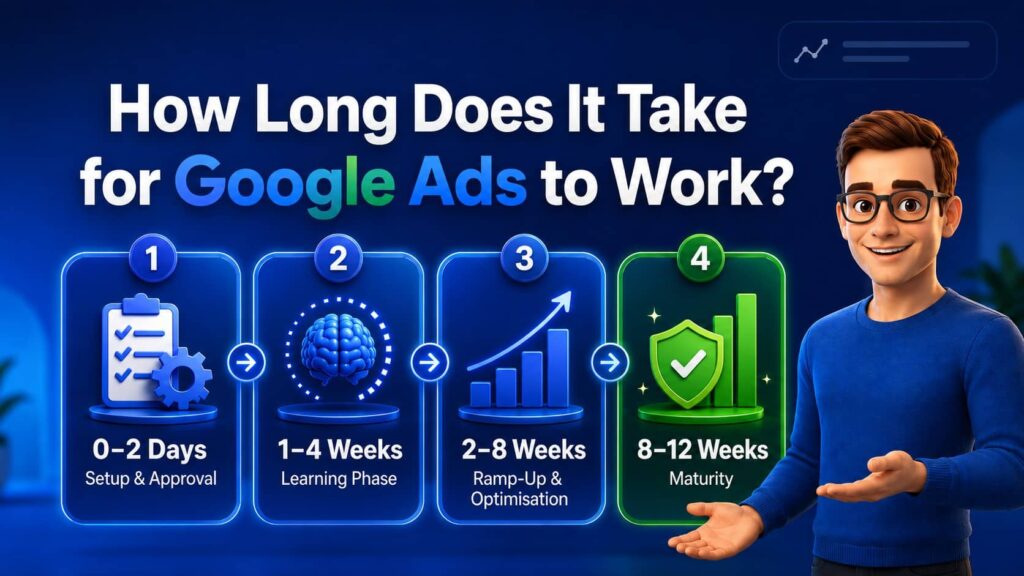
- 0–2 Days: Setup, approval, and initial impressions.
- 1–4 Weeks: The Learning Phase.
- 2–8 Weeks: Active ramp-up and optimization.
- 8–12 Weeks: Maturity (one full quarter baseline).
How long does it take for Google Ads to work? On average, it takes 3 months (90 days) for a Google Ads campaign to fully mature, stabilize, and deliver a reliable Return on Ad Spend (ROAS). While your campaigns will start gathering impressions and clicks within the first 24 to 48 hours, Google’s machine-learning algorithm requires this initial 3-month testing phase to optimize bids, collect conversion data, and lower your cost per lead.
Your returns depend heavily on budget, cost-per-click, location, and competition. To gather enough data, you need at least 10 to 15 clicks daily. However, traffic alone isn’t enough; if you have clicks but no actual conversions, drawing concrete conclusions is impossible—even after three months. Furthermore, adjusting campaigns too soon resets this learning clock.
This guide demystifies the entire timeline. You will learn exactly what to expect, how to properly optimize, and when to finally measure true success.
Contents
- 1. How Long Does It Take for Google Ads to Work
- 1.1. How Long Does It Take for Google Ads to Work
- 1.2. Understanding the Google Ads Timeline & Why Timing Matters
- 1.3. Phase 1 – Setup and Approval: How Long for Google Ads to Kick In? (Day 0–2)
- 1.4. Phase 2 – Navigating the Google Ads Learning Phase (Week 1–4)
- 1.5. Let's Talk!
- 1.5.1. Phase 3 – The Google Ads Optimization Timeline (Weeks 2–8)
- 1.5.2. Adjusting Bids and Budgets for Competitive Auctions
- 1.5.3. Adding Negative Keywords and Refining Targeting
- 1.5.4. Switching to Smart Bidding & Automation
- 1.5.5. Key Metrics to Monitor (CTR, CPC, CPA, ROAS)
- 1.5.6. How to Interpret Volatile Results During Optimization
- 1.6. Phase 4 – Maturity & Scaling: When Do Google Ads Start Working? (Weeks 8–12+)
- 1.7. Why Your Google Ads Might Not Be Working & How to Fix It
- 1.8. How Long Does It Take for Google Ads to Work for Different Industries?
- 1.9. Expert Tips to Speed Up How Long It Takes for Google Ads to Work
- 1.10. How Long Does It Take for Google Ads to Work? Your Next Steps to Accelerate Results
- 1.11. FAQ: How Long Does It Take for Google Ads to Work?
- 1.11.1. 1. How long does it take for Google Ads to work?
- 1.11.2. 2. How long do Google Ads take to kick in?
- 1.11.3. 3. How long does the Google Ads learning phase last?
- 1.11.4. 4. How long should I run a Google Ads campaign before deciding it is not working?
- 1.11.5. 5. Why are my Google Ads not showing right away?
- 1.11.6. 6. Can a higher budget speed up how quickly Google Ads work?
- 1.11.7. 7. How long does it take for Google Ads to generate a consistent ROI?
- 1.11.8. 8. When will my Google Ads appear on the search results?
- 1.11.9. 9. How long does the Google Ads optimisation timeline take?
- 1.11.10. 10. How long before I can evaluate conversions in my Google Ads timeline?
- 1.11.11. Daniel Ostrzyzek
- 1.12. Let's Talk!
Understanding the Google Ads Timeline & Why Timing Matters
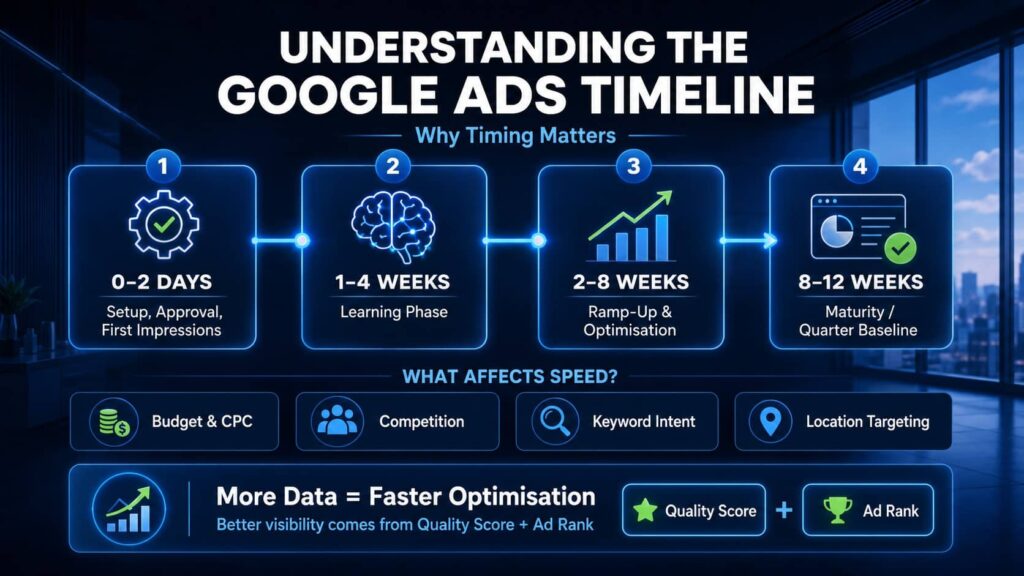
Before diving into the specific timeline, it is crucial to understand the mechanics behind Google Ads. The platform is not a simple vending machine where you insert money and immediately extract conversions. It is a highly dynamic, machine-learning-driven ecosystem.
Overview of Google Ads and the Auction System
Every time a user searches on Google, an invisible, lightning-fast auction takes place. Advertisers bid on specific keywords relevant to their business to have their ads displayed on the search engine results page (SERP). However, winning this auction is not solely about having the deepest pockets. Google’s primary goal is to show the most relevant, high-quality ads to its users.
Because the system relies on algorithms to match the right ad to the right user at the perfect moment, it requires historical data to function efficiently. This data accumulation is exactly why Google Ads takes time to ramp up and optimize.
Factors That Influence How Quickly Google Ads Work
When clients ask me how long does it take for Google ads to work, I always explain that not all campaigns mature at the same rate. The speed at which you gather actionable data and see a return on investment (ROI) depends on several key variables:
- Budget & CPC: To gain meaningful insights, your daily budget must support enough traffic. As a baseline, you need a minimum of 10 to 15 clicks per day. If your industry has a high cost-per-click (CPC) and your budget only allows for a few clicks a day, it will be incredibly difficult to gain enough data to draw concrete conclusions—even after a full three months.
- Industry & Market Competition: Highly competitive industries (like finance, or insurance) face aggressive bidding and higher CPCs. This often requires either a larger initial budget or a longer timeline to collect statistically significant data.
- Keyword Intent: Keywords with high commercial intent (e.g., „emergency plumber near me”) tend to convert faster than broader, informational queries, accelerating your path to measurable conversions.
- Location Targeting: Targeting a small local radius naturally limits your search volume, which can slow down the rate of data collection compared to a broader state or national campaign.
Quality Score, Ad Rank and Their Impact on Visibility
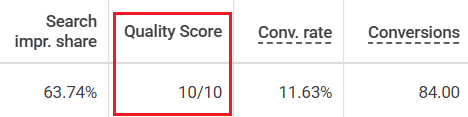
To understand why some campaigns get immediate traction while others struggle to even spend their budget, you need to monitor two critical metrics:
- Quality Score: This is Google’s rating (from 1 to 10) of the quality and relevance of your keywords and ads. It is calculated based on three factors: expected click-through rate (CTR), ad relevance, and landing page experience.
- Ad Rank: This determines your actual ad position on the SERP and whether your ads will show at all. It is primarily calculated using your maximum bid amount combined with your Quality Score.
A high Quality Score directly improves your Ad Rank. This means you can effectively pay less per click while still ranking higher than competitors who have lower-quality ads. Better visibility leads to a faster influx of clicks, which feeds the algorithm the data it needs to optimize your campaign—ultimately accelerating your overall timeline to success.
Phase 1 – Setup and Approval: How Long for Google Ads to Kick In? (Day 0–2)

The first 48 hours of your campaign are entirely about technical setup, review, and getting your ads off the ground. If you choose the smart bidding strategy you will also notice the status “Bid strategy learning”.
Setting Up a New Google Ads Campaign
Before you even hit „launch,” the most critical step is ensuring your foundation is solid. From my experience, we must always prioritize conversions, leads, and signed clients. Therefore, it is absolutely essential to set up proper conversion tracking before the campaign launches. If you skip this, you will have no way to measure success or feed the algorithm the data it needs to optimize later.
How Long Does Ad Approval Take? Google Policies and Review Process

Once you submit your campaign, your ads do not go live instantly. They must pass Google’s automated (and sometimes manual) review process to ensure they comply with advertising policies. This ad approval stage typically takes 24 to 48 hours. If your keywords and ads are in a highly regulated industry (like healthcare or finance), this review could take slightly longer.
What to Expect in the First 24–48 Hours (Impressions vs. clicks)
Once approved, your ads will enter the auction. You will usually start seeing impressions (how often your ad is shown) within a day or two. Clicks typically follow shortly after. Do not panic if your dashboard shows zero activity in the first 12 hours—the system needs a little time to start distributing your budget.
Phase 2 – Navigating the Google Ads Learning Phase (Week 1–4)
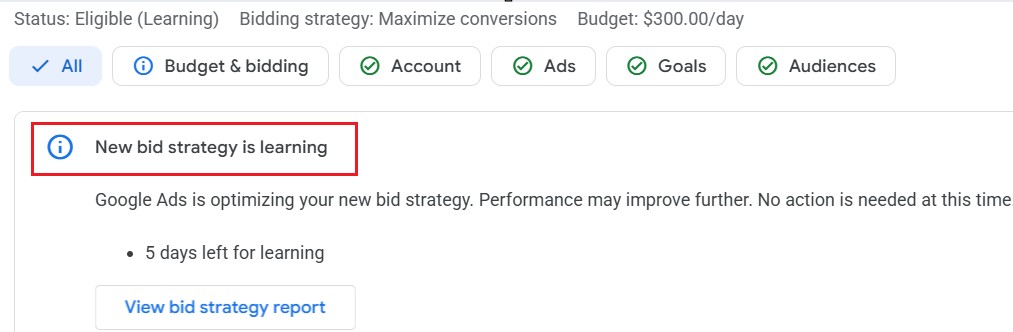
Once your ads are live and getting traffic, you enter one of the most misunderstood stages of the Google Ads timeline.
What Is the Google Ads Learning Phase?
The learning phase is a period where Google’s algorithm actively tests your ads across different search queries, times of day, and audiences to figure out what combination yields the best results. During this time, performance can be highly volatile. In fact, it is completely normal for conversion rates to actually decrease or fluctuate wildly at first.
Data Accumulation and Algorithm Optimization
To optimize effectively, the algorithm relies heavily on data accumulation. This is exactly why you need a daily budget that supports at least 10 to 15 clicks per day. If you only get a few clicks daily, the algorithm starves, making it incredibly difficult to draw any meaningful conclusions about the campaign’s performance.
How Long Does the Learning Phase Last? (1–4 weeks; 50 conversions threshold)
Typically, the learning phase lasts anywhere from 1 to 4 weeks. However, this timeline is dictated by data volume rather than just the calendar. Google’s automated bidding strategies generally need around 50 conversions within a 30-day window to fully exit the learning phase and stabilize.
Do’s and Don’ts During the Learning Phase
Patience is your best strategy here. Making sudden moves will only hurt your performance.
- DO ensure proper tracking: Double-check that your conversion tracking is firing correctly so the algorithm learns from actual leads.
- DO focus on data collection: Let the system gather enough clicks to show you clear trends.
- DON’T make large edits: Avoid major changes to your budget, bidding strategy, or targeting. Rushing these adjustments will reset the learning phase back to day one.
- DON’T pause the campaign too early: Let the algorithm finish its job before deciding the campaign is a failure.

Let's Talk!
I’m here to help you grow your business with the power of Google Ads. If you’re ready to take your campaigns to the next level – Schedule My Free Consultation
Phase 3 – The Google Ads Optimization Timeline (Weeks 2–8)
While the initial learning phase is underway, the ramp-up and optimization period spans your first two months. This is when you transition from simply collecting data to actively refining your campaign for better performance.
Adjusting Bids and Budgets for Competitive Auctions
During this phase, you will start seeing which keywords are generating traffic and which are draining your budget. Adjusting bids and budgets allows you to remain competitive in the auction. If a particular ad group is performing well, you might allocate more budget to it, whereas underperforming areas can be scaled back.
Adding Negative Keywords and Refining Targeting
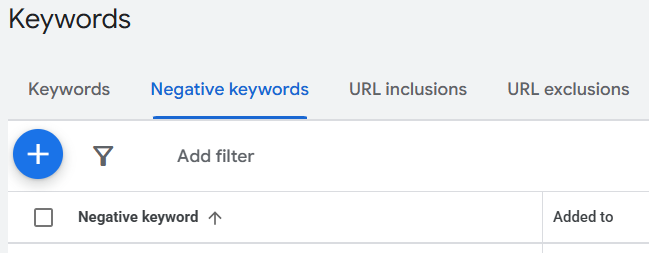
One of the most impactful tasks during the first two months is adding negative keywords. By reviewing your search terms report, you can identify and exclude irrelevant search queries that are wasting your budget. Refining your targeting ensures that your ads are only shown to users with the highest intent.
Switching to Smart Bidding & Automation
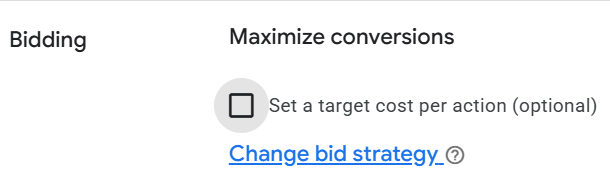
When you first launch, you might use manual strategies to gather data. However, switching to smart bidding—such as Maximise Conversions or Target CPA—is recommended once enough data is collected. Google’s automation works incredibly well, but only when it has a solid foundation of historical conversion data to guide its decisions. You need at least 30 conversions from the last 30 days to switch to smart bidding.
Key Metrics to Monitor (CTR, CPC, CPA, ROAS)
Rather than obsessing over impressions, you should suggest focusing on your click-through rate (CTR) and conversion rate. Other key metrics to monitor include your Cost Per Click (CPC), Cost Per Action (CPA), and Return on Ad Spend (ROAS). These metrics will tell you the true financial health of your campaign.
How to Interpret Volatile Results During Optimization
It is crucial to remain patient, as conversion rates may initially decrease or remain volatile during this stage. Do not panic and make sweeping changes. Volatility is a normal part of the algorithm testing different variables to find the most profitable pockets of traffic.
Phase 4 – Maturity & Scaling: When Do Google Ads Start Working? (Weeks 8–12+)
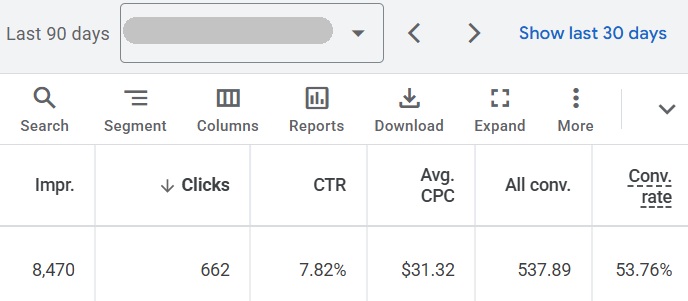
As you approach the end of your second month, your campaign exits the volatile stages and enters maturity.
When Do Google Ads Start “Working”? Consistent ROI & Profitability
To truly answer how long does it take for Google ads to work, you have to look at the 8-to-12-week mark. Achieving consistent profitability typically requires this full optimization window. After 3 months of running the campaigns, you essentially have one full quarter, which is a good baseline to accurately see the performance. At this stage, you can confidently decide what to do next based on concrete data, actual conversions, leads, and signed clients.
Case Studies: E‑commerce vs. Local Service Businesses
Timelines and required budgets can vary wildly depending on your industry.
- Local Service Businesses: A local plumber running a highly targeted search campaign with a healthy budget might see signed clients by week four because the geographic area is tight and the intent is urgent.
- E-commerce Stores: An online retailer competing nationally will often need a larger budget and the full 12 weeks to mature, as the algorithm has a much larger audience to test and competition is generally fiercer.
Scaling Budgets and Expanding Campaign Types
Once you have achieved a profitable baseline, it is time to scale. You can confidently increase the daily budgets on your winning campaigns. This is also the perfect time to explore expanding campaign types, such as adding Display, Video, Shopping, PMAX or Local Services ads to capture a wider audience.
When to Re‑evaluate or Restructure Your Account
If you have reached the end of the 12-week mark, maintained at least 10 to 15 clicks a day, and are still not seeing conversions or signed clients, it is time to re-evaluate. You may need to restructure your account, overhaul your landing pages, or reassess your core offer entirely.
Why Your Google Ads Might Not Be Working & How to Fix It
Sometimes you hit launch, and either your ads fail to show entirely, or you are burning through your budget without seeing a single lead. Before you decide the platform doesn’t work, check these common roadblocks.
Payment and Billing Issues

It sounds incredibly basic, but payment issues are one of the most common reasons ads fail to show. If Google cannot process your payment, your campaign will remain paused indefinitely.
- The Fix: Go to the billing section in your Google Ads dashboard. Ensure your credit card is not expired, your account has no outstanding balances, and your bank is not blocking the transaction.
Targeting, Scheduling & Location Settings
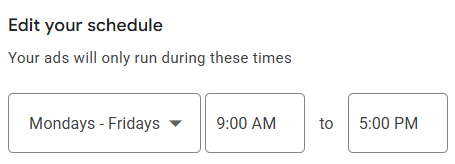
Overly restrictive targeting can choke your campaign before it even starts. If you schedule your ads to only run for two hours a day in a hyper-specific postcode, you will struggle to get the impressions you need.
- The Fix: Review your location and ad scheduling settings. For most service based businesses we use Monday to Friday in the office working hours. Ensure your target area has enough search volume to hit that minimum threshold of 10 to 15 clicks per day.
Low Bids and High Competition
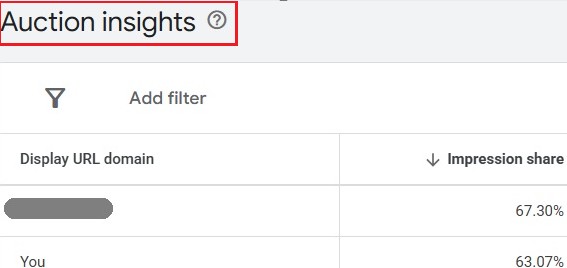
If your maximum bid is significantly lower than what your competitors are paying, Google simply won’t show your ad. The auction system is ruthless—if you underbid in a highly competitive market, your ad rank will plummet.
- The Fix: Check your keyword status for the „Below first page bid” warning. You may need to increase your bids or daily budget to remain competitive in the auction. Additionally, dive into the Auction Insights report to see exactly which competitors are outranking you and how much impression share you are losing to them.
Ad Disapproval & Policy Violations
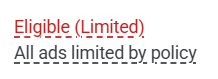
Google has strict advertising policies, and if your ad violates them (even accidentally), it will be disapproved and will not run. This is particularly common in industries like healthcare, finance, or housing.
- The Fix: Check the „Status” column in your dashboard. If an ad is disapproved, Google will usually provide a reason. Edit the ad to comply with the policy and resubmit it for review.
Landing Page Quality and Conversion Tracking
If your ads are successfully driving traffic but you are not getting leads, the problem is usually what happens after the click. Furthermore, if you are getting clicks but no conversions, you cannot draw any concrete conclusions about your campaign’s performance.
- The Fix: First, it is critical to properly set up conversion tracking before the campaign launches. If tracking is broken, the algorithm cannot learn. Second, audit your landing page. Ensure it loads quickly, provides exactly what the user searched for, and has a clear, easy-to-find call to action.
How Long Does It Take for Google Ads to Work for Different Industries?
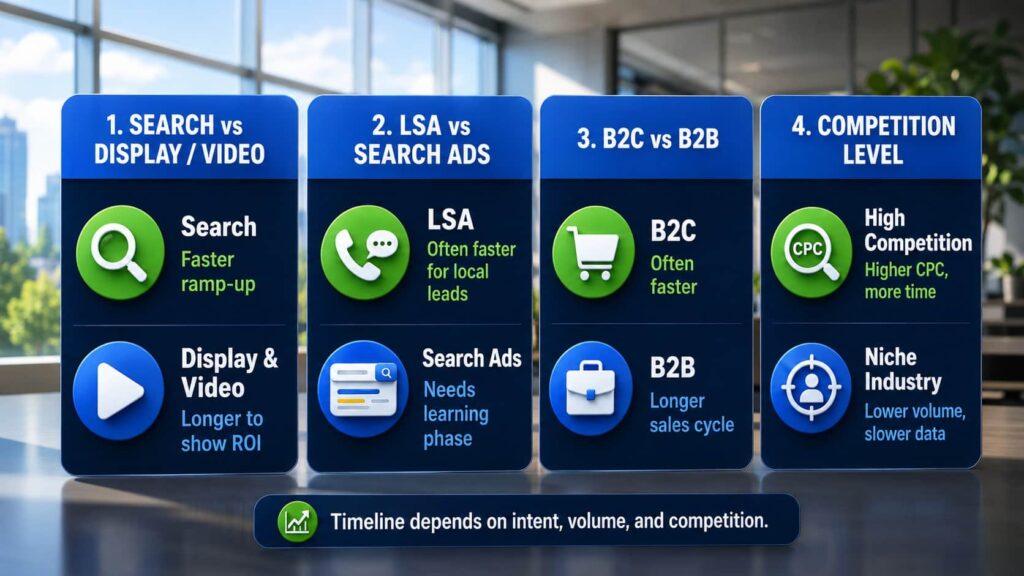
Google Ads is not a one-size-fits-all platform. The timeline for gathering data and seeing a return on investment shifts dramatically based on the type of campaign you run and the specific industry you operate in.
Search vs. Display vs. Video Campaigns – Timeline Differences
The format of your ad heavily influences how quickly you see results.
- Search Campaigns: Because these capture high-intent users who are actively searching for a solution, they generally have the fastest ramp-up time to direct conversions.
- Display and Video Campaigns: These are primarily top-of-funnel, brand-awareness channels. Because they rely on passive intent rather than active searches, Display and Video campaigns typically require a longer learning phase to mature and a longer timeline to demonstrate direct ROI.
Local Service Ads (LSA) vs. Standard Search Ads
For local businesses, choosing the right ad format changes your timeline. Standard Search Ads give you granular control over keywords and bidding, but they still require that standard 1-to-4-week learning phase to dial in. Local Service Ads (LSA), on the other hand, operate on a pay-per-lead model rather than pay-per-click. Because Google places them at the very top of the results with a „Google Guaranteed” badge, LSAs can often generate phone calls and direct leads much faster for local tradesmen.
B2B vs. B2C & High‑competition vs. Niche Industries
Your business model and market heavily dictate your timeline.
- B2B vs. B2C: B2B sales cycles are naturally longer than B2C. A B2C e-commerce campaign might generate impulse purchases within days, whereas a B2B software campaign could take months to turn a single click into a signed client.
- Competition Levels: High-competition industries (like finance, or insurance) have massive cost-per-click (CPC) rates. This means you will need larger budgets and longer learning phases to gather enough data. Conversely, highly niche industries might have cheaper clicks but much lower search volume, making it a slower process to hit that crucial threshold of 10 to 15 clicks a day.
Budget Considerations and Expected ROI
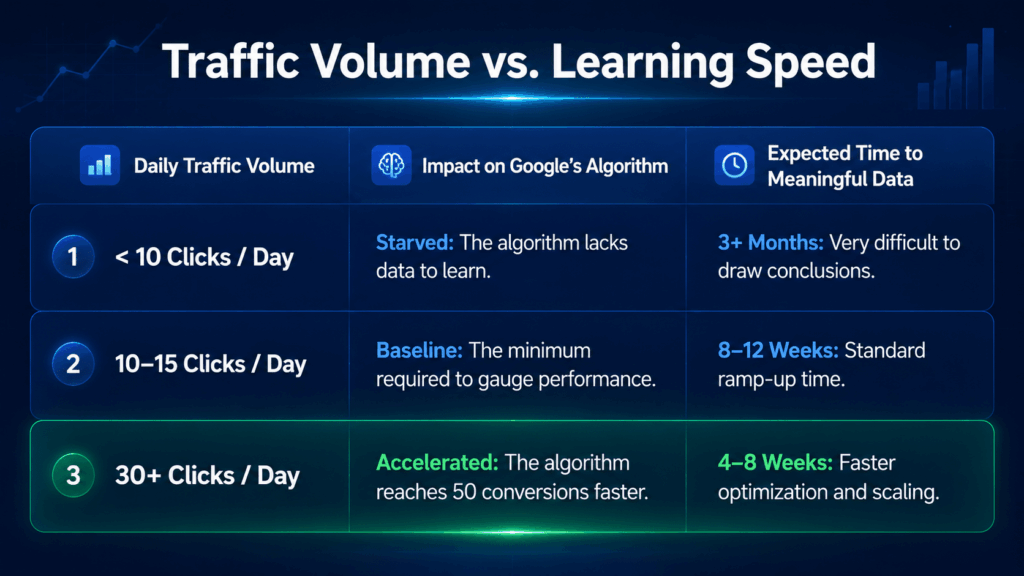
Ultimately, your budget acts as the accelerator pedal for your timeline. How fast your campaign works depends directly on your available budget, how high the CPC is, your target location, and how big your competitors are.
If you are in a high-CPC industry, a small daily budget will severely throttle your data collection. As a baseline for service businesses, you should aim for at least 10 to 15 clicks per day to get a clear picture of performance after the first month. If your budget cannot support that minimum traffic volume, you will struggle to gain enough data to accelerate the campaign and draw valid conclusions about your expected ROI, even after three months.
Expert Tips to Speed Up How Long It Takes for Google Ads to Work
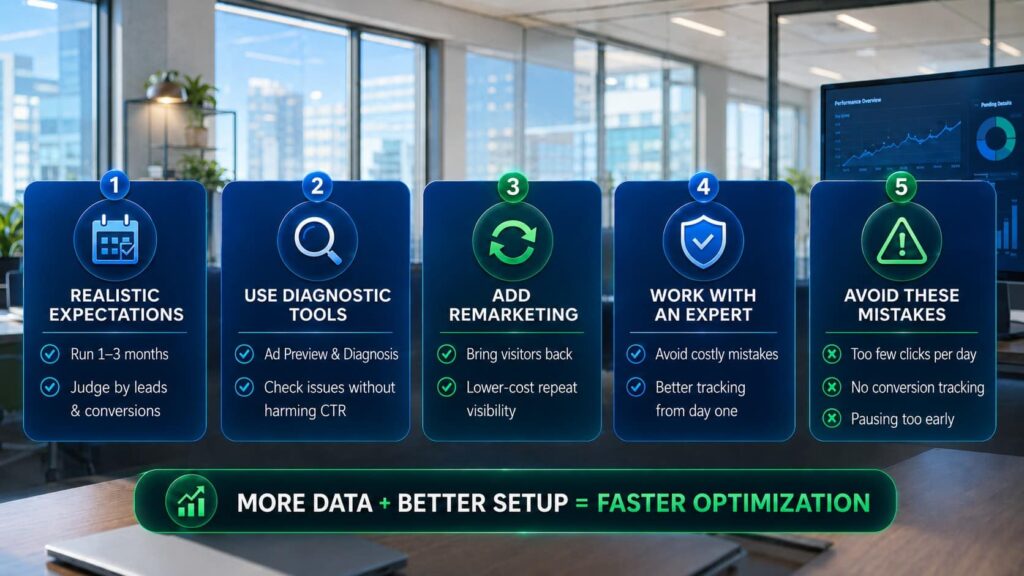
While the algorithm requires time to mature, there are several strategic ways to support the process and ensure you aren’t wasting money during the ramp-up phase.
Setting Realistic Expectations & Patience
Normally, the good practice is to run Google Ads for at least 1 to 3 months to see if it’s working for us or not. But we need to remember that is not an ultimate rule. Your actual timeline heavily depends on what budget you have, how high the CPC is, the location, how big your competitors are, and how competitive the market is. Patience is critical here. After these 3 months, we can decide what we should do next, always basing that decision on hard data, conversions, leads, and signed clients.
Leveraging Google’s Diagnostic & Preview Tools
Instead of repeatedly searching for your own ads on Google (which hurts your click-through rate and artificially inflates your impressions without clicks), use Google’s Ad Preview and Diagnosis tool. This allows you to see exactly how your ads appear in the wild and actively highlights any targeting, bidding, or policy issues preventing them from showing.
Using Remarketing and Audience Expansion
Most users will not convert on their very first click. Setting up remarketing campaigns allows you to stay in front of users who have already visited your site, usually at a much lower cost-per-click. This helps accelerate your overall conversion volume and keeps your brand top-of-mind while your standard search campaigns are still navigating the learning phase.
Working with Agencies or Freelancers vs. Managing In‑house
Running Google Ads requires continuous monitoring and deep technical knowledge. Managing campaigns in-house might seem like a way to save on initial fees, but the learning curve often results in heavily wasted ad spend. On the other end of the spectrum, large agencies can be expensive and often pass your account off to junior account managers. Working directly with an experienced freelance PPC expert gives you the best of both worlds. You bypass rookie errors, ensure your conversion tracking is flawless from day one, and get dedicated, expert attention to guarantee your budget is allocated as efficiently as possible.
Avoiding Common Mistakes
Several common pitfalls can completely derail your timeline and drain your budget:
- Unrealistic Budgets: If someone has only a few clicks per day, it will be very difficult to gain enough data to accelerate Google Ads and draw conclusions even after 3 months. We need at least 10 – 15 clicks per day to run any search campaign for any business to have the minimum data, though the more is better.
- Ignoring Conversions: Traffic alone means nothing. If even we have the minimum clicks but no conversions, we can not have any conclusion about this campaign and the performance of this campaign. It is incredibly important to setup properly conversion tracking before the campaign launch.
- Pausing Too Early: Never halt a campaign in the first few weeks just because results look volatile. After 3 months of running the campaigns, basically one quarter is a good baseline to see the performance.
How Long Does It Take for Google Ads to Work? Your Next Steps to Accelerate Results
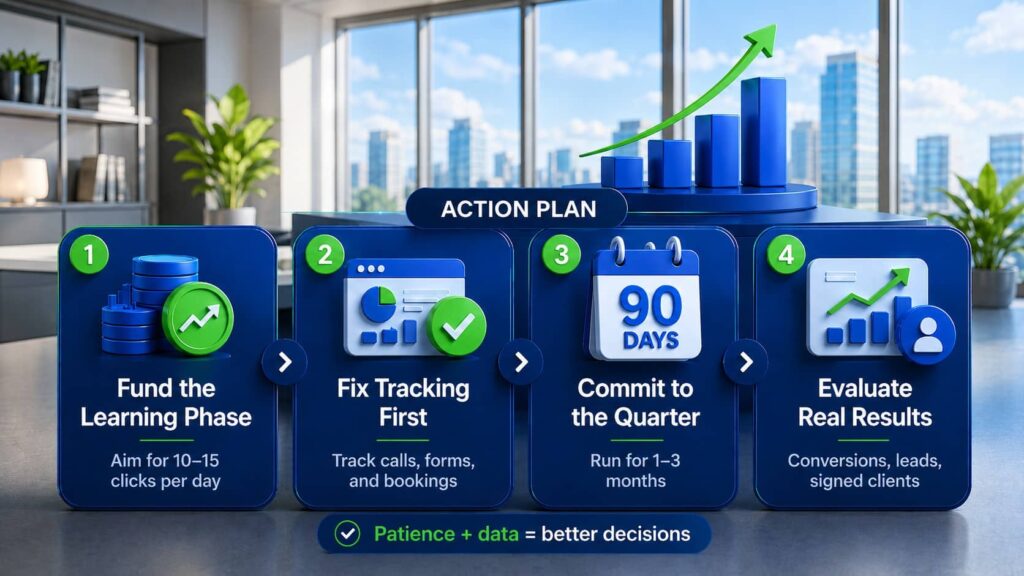
Ultimately, figuring out how long does it take for Google ads to work is only half the battle; the other half is having the patience and the strategy to survive the ramp-up period.
If you are ready to launch, here is your immediate action plan to ensure you don’t waste your budget during those critical first few weeks:
- Fund the Learning Phase: Ensure your daily budget can comfortably afford at least 10 to 15 clicks per day. If your budget only allows for a few clicks daily, you will starve the algorithm, making it nearly impossible to draw accurate conclusions even after three months.
- Fix Your Tracking First: Never launch a campaign without tracking. It is absolutely crucial to set up proper conversion tracking before the campaign goes live. Traffic is a vanity metric; if you are getting clicks but no conversions, you cannot accurately judge the campaign’s performance.
- Commit to the Quarter: Treat your initial launch as a 90-day investment. Running campaigns for at least 1 to 3 months (one full quarter) is the best practice to establish a reliable baseline.
- Evaluate on Real Business Metrics: After those three months, do not just look at click-through rates. Make your next decisions based purely on hard data: actual conversions, qualified leads, and signed clients.
Ready to skip the expensive learning curve?
Managing a Google Ads account in-house often means paying for rookie mistakes out of your own ad budget. Navigating the setup, the volatile learning phase, and the ongoing optimization requires daily monitoring and deep technical expertise.
As a freelance Google Ads expert, I help businesses skip the guesswork. I will ensure your conversion tracking is flawless from day one, your budget is allocated efficiently, and your campaigns are built for long-term profitability.
Stop wasting ad spend on trial and error. Contact me today to get your campaigns set up for measurable growth.
FAQ: How Long Does It Take for Google Ads to Work?
1. How long does it take for Google Ads to work?
It usually takes 24 to 48 hours for your ads to be approved and start gathering impressions and clicks. However, achieving consistent profitability and meaningful optimization typically requires an 8-to-12-week window.
2. How long do Google Ads take to kick in?
Your ads will generally „kick in” and begin generating traffic within one to two days after passing Google’s automated review process.
3. How long does the Google Ads learning phase last?
The Google Ads learning phase typically lasts 1 to 4 weeks. During this time, the algorithm is testing different variables and needs to accumulate enough data—generally around 50 conversions—to stabilize.
4. How long should I run a Google Ads campaign before deciding it is not working?
A good practice is to run your Google Ads for at least 1 to 3 months. One full quarter (3 months) serves as an excellent baseline to properly gauge performance based on hard data and signed clients.
5. Why are my Google Ads not showing right away?
If your ads are not showing, they might still be in the standard 24-to-48-hour approval process. Other common culprits include payment and billing issues, location targeting restrictions, or bids that are too low for your market.
6. Can a higher budget speed up how quickly Google Ads work?
Yes, to an extent. You need at least 10 to 15 clicks per day to feed the algorithm the minimum data required. If you have a tiny budget that only allows for a few clicks daily, it will be very difficult to gain enough data to draw conclusions, even after 3 months.
7. How long does it take for Google Ads to generate a consistent ROI?
While you will see initial traffic quickly, generating a consistent return on investment (ROI) usually happens during the maturity phase, which is weeks 8 to 12.
8. When will my Google Ads appear on the search results?
Once approved, they can appear almost immediately (within 24 to 48 hours). However, your actual visibility and position on the page depend heavily on your Quality Score and Ad Rank.
9. How long does the Google Ads optimisation timeline take?
The active ramp-up and optimization timeline generally occurs between weeks 2 and 8. This is when you collect initial data and start adding negative keywords, adjusting bids, and switching to smart bidding.
10. How long before I can evaluate conversions in my Google Ads timeline?
You should have a much better picture of your conversions after the first month of the campaign running. However, if you are getting clicks but zero conversions after a week or two, it is a sign that something is wrong, highlighting why proper conversion tracking is critical.

Daniel Ostrzyzek
Hi, I’m Daniel Ostrzyzek, a passionate Google Ads specialist with over 8 years of experience. I work with small to medium-sized businesses to help them attract leads, achieve their growth goals, and maximize ROI through Google Ads campaigns. After discovering my passion for digital marketing, I dove deep into Google Ads. Over the years, I’ve gained valuable experience working with businesses across various industries. I specialize in Google Ads Search and lead generation campaigns, helping my clients maximize the results of their online advertising.
Let's Talk!
I’m here to help you grow your business with the power of Google Ads. If you’re ready to take your campaigns to the next level – Schedule My Free Consultation